Guys! We re fighting for number 1 in the GPT-6 astra challenge today!
Thank you so much for all your support! We re currently at number 2, and we are going up fast!
Every support will help us hit the top spot and hang in until the end. Thank you so much for your upvotes, comments, and everything! Try MosMos!
https://www.producthunt.com/prod...





AIQRHub
A great tool, looking forward to more features.
MosMos
@kkliu Thanks, Kirin! What's one task you'd most like MosMos to help with next?
STORI
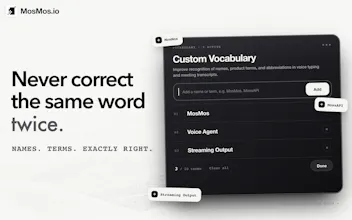
The personal glossary might be the most underrated feature here. Every dictation tool I tried keeps mangling the same five company names and industry terms forever. Adding them once and being done sounds like the fix. Congrats on the launch
MosMos
@elene_tandashvili Thanks so much Elene!!
Having to fix the same five words every time is exactly the frustration the personal glossary is meant to address. You can save those names and terms for MosMos to use during recognition.
Would love to hear how it handles your usual troublemakers!
MosMos
@elene_tandashvili Thanks, Elene! That repeated correction loop is exactly what we wanted to eliminate. Add a company name or industry term once, and MosMos remembers it from then on.
Congrats on the launch! This looks like a really useful question: is there a Windows version planned, or is it staying macOS-only for now?
MosMos
@nrupen_mandava Thanks! Windows is already in the works, and we’re aiming to release the first version around next Monday.
MosMos
@nrupen_mandava Thanks for the support! Stay tuned 🙌
Circle to Search
MosMos
@yinn1014 That’s exactly the kind of workflow we had in mind! You can also customize the meeting notes template to focus on what you need for the follow-up, like key conclusions and next steps.
I added a project name to the personal vocabulary and tried it in a full sentence. Seeing it recognized in context was the useful part of that test.
MosMos
@jojo_fang Thanks for testing it in a full sentence, Jojo! Glad the project name came through; that's much closer to everyday use than saying it on its own.
MosMos
@jojo_fang That’s encouraging, Jojo! The same glossary also carries over to meeting transcription and notes, so you won’t need to add that project name again there. Let us know how it holds up as you keep using it.
MosMos
@jojo_fang Thanks for testing it in a real sentence, Jojo! That’s exactly the goal: not just saving a term, but recognizing it naturally in context.
AskDeck
Congrats on #2. "Before, during and after meetings" is the right frame — the thought you want written down almost never arrives while you're sitting at a keyboard. Question on the "before" piece: if I dictate a half-formed brief on the walk in, does the glossary and polish level carry into the meeting notes afterwards, so the same terms are spelled the same way in both? That's where dictation tools usually drift for me. I built AskDeck, which is voice-first for a different output (a deck), so I have opinions on how much structure to impose on spoken thoughts — curious where you landed.
MosMos
@thicreator Thanks for the congrats, and great to hear from someone building another voice-first product!
The glossary is shared across dictation, meeting transcription, and meeting notes, so the terms you add are available in all three to help keep naming consistent.The polish level works separately: dictation currently has three levels, with the lowest preserving the original transcription without rewriting. Meeting notes use their own templates, including a custom prompt, so you can choose the structure you need afterward.
That’s where we’ve landed on structure: let users control how much their spoken thoughts get reshaped. Custom dictation-polishing templates are also planned, though we haven’t committed to a release date. Curious how you’re approaching that balance with AskDeck!
AskDeck
@lego260312 shared glossary across all three is the right call, that's exactly the drift I was worried about. Ours is the opposite bet: we impose a lot of structure on purpose. Eric asks two things before anything else, who is this for and what should they walk away with, then the spoken ramble gets shaped around that one point. Works because a deck needs a spine. For notes I think your approach is right, nobody wants their own thoughts rewritten. Good luck with the rest of the day.
MosMos
@thicreator “A deck needs a spine” is a great way to put it. I can see why those two questions come first. With notes, sometimes you’re still figuring out what you think as you speak, so we want to leave room for that. Really enjoyed hearing your take on this—thanks for sharing, and for the good wishes!
MosMos
@lego260312 @thicreator That distinction makes a lot of sense: a deck needs a clear spine, while notes need fidelity first. Those two questions are a smart way to anchor the structure. Thanks for sharing, and good luck with AskDeck too!
Love the attention to what happens after a meeting. Speaker labels, timestamps, and a summary are a practical combination for getting notes ready to share.
MosMos
@qiwap Thanks ! There’s still work to do once the meeting ends: checking who said what and pulling together something useful to share. That’s the part we really wanted to make easier.
MosMos
@qiwap Thanks, QIQI! That was a big pain point for us too. The meeting ends, but someone still has to turn the recording into something the team can actually use.