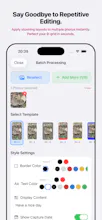
Add elegant, customizable borders in multiple colors — not just white — and auto-generated "Day X" labels to your photos, without any manual counting. Import once, preview 7 premium frame styles at a glance, and personalize colors to match your aesthetic. Batch-edit up to 9 photos at once. Runs 100% offline, so your photos never leave your device.
No reviews yetBe the first to leave a review for MemoFrame
Maker
📌
Hey PH, maker of MemoFrame here 👋
The idea started when, as a new parent, I was taking endless baby photos but could never remember how many days old my child was in each one. I wanted a way to auto-calculate the days between the shooting date and a set date—no manual counting.
But quickly I realized this applies to so much more: fitness streaks, anniversaries, travel day counts, even tracking a new habit. Whether it's "Day 47 of working out" or "Day 200 since we met," the smart counter makes visual progress effortless.
The other frustration: most apps force you to enter a frame style first, then pick a photo. To try another style, you go back and repeat. I just wanted to see all 7 frame styles at once on the same photo. So MemoFrame lets you import once and preview all premium borders instantly—each with customizable colors, not just white.
Some borders overlay the date on the photo for a retro feel; others place it cleanly on the frame so the image itself is untouched. If you don't need the border later, you can simply crop it off. The app also reads EXIF data to show the original shooting date, so even old photos get their "taken on" timestamp without ruining the aesthetics.
Bonus: batch-edit up to 9 photos at once, and everything runs 100% offline—zero privacy leaks.
Whether you're tracking your baby's monthly milestone, your fitness journey, or just adding a stylish date to a life moment—MemoFrame is built for it. Full features free for a limited time. I'd love to hear your honest thoughts and what other functions or frames you'd like to see. Thanks for checking it out 🙂