Launching today

Meet Clocks
Timezone badges & Golden Hours directly in Google Meet
2 followers
Timezone badges & Golden Hours directly in Google Meet
2 followers
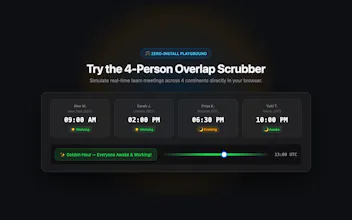
Ambient timezone badges & Golden Hours planning inside Google Meet video tiles. • Stationary video badges with local time, offsets (+3h, −13h), and day shifts • ☀️/🌙 daylight dots and sleep alerts (09:00–18:00 work, 22:30–06:30 sleep warning) • 24-hour visual Golden Hours ribbon with 30-minute intervals • 1-click in-call chat sharing proposals • Zero-trust privacy: only requests "storage", zero tracking, ephemeral relay • 100% free on the Chrome Web Store with zero tracking


Hey Product Hunt! 👋 I'm @mamarezza, the creator of Meet Clocks.
I work daily with engineers and teammates scattered between North America, Europe, and Asia. Timezone math on calendar invites is manageable, but during live video calls, calculating hours in your head completely breaks conversational momentum.
I kept asking myself: "Why doesn't Google Meet just show what time it is for everyone right on their tile?"
So I built Meet Clocks as a lightweight, zero-permission, privacy-first extension. A few principles I refused to compromise on:
1. Zero Permission Bloat: Most extensions ask for broad access to read all websites or intercept network requests. Meet Clocks only requests "storage" to save your 12h/24h toggle. It has zero access to camera, microphone, or meeting contents.
2. Collision-Free UX: Video tiles in Meet constantly resize and reorder. The badges use an intelligent observer to anchor in free corners and fade out on hover so native Google Meet controls are never blocked.
3. 30-Minute Golden Hours: Scrubbing a synchronous slider to see when 4 teammates in different hemispheres can meet without anyone waking up at 4 AM.
You can test the 4-person interactive scrubber directly in your browser without installing anything:
👉 https://meet-clocks-relay.mamare...
Install free on the Chrome Web Store:
👉 https://chromewebstore.google.co...
I'd love to hear your feedback!