Marked 3 - Markdown Preview for Mac
Live Markdown preview for any editor with advanced export
155 followers
Live Markdown preview for any editor with advanced export
155 followers
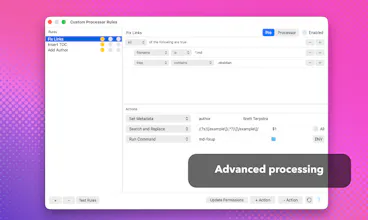
Marked 3 is the biggest update to Marked in over a decade. The predominant Mac tool for previewing and exporting Markdown now has best-in-class DOCX handling, new PDF export options, EPUB export, Speed Reading (RSVP) mode, and much more.
This is the 2nd launch from Marked 3 - Markdown Preview for Mac. View more
Marked 3
Launching today
Marked is a powerful markdown preview and converter. It supports HTML, PDF, DOCX, EPUB, and more, along with writing and analysis tools, custom style builder, and much more.


Free Options
Launch Team

Marked 3 - Markdown Preview for Mac
@ttscoff 80 hours per week is impressive! Congratulations on the update!
Marked 3 - Markdown Preview for Mac
In addition to the promo code for Product Hunt users, there's intro pricing that you can lock in.
@ttscoff this looks great! how do I get the promo code?
Marked's whole appeal to me is that it never tried to become an editor. It previews, it exports, done. Does v3 let you set CSS themes per document, or is that still a global preference? I keep different output styles for different targets, and switching app-wide every time is the one bit of friction I hit.
Marked 3 - Markdown Preview for Mac
@fberrez1 Marked 3 still lets you set styles per-document, and the latest version also remembers styles for each document, even if the document moves. You can set a style using metadata, or just use the keyboard shortcuts to switch. You can also now edit, generate, re-order, rename, and add/remove styles with the Style Manager.
@ttscoff per-document memory that survives a move is the exact thing I was missing. I keep a style per publish target, and the app-wide switch was my one real gripe, so that's solved. Going to put the Style Manager through its paces this week. Thanks for the reply!
12 years between Marked 2 and 3 - really respect the discipline of not turning a preview tool into yet another editor. Most "minimal" tools quietly scope-creep into editors over time. Curious: with the new per-document style memory Florent mentioned, does it survive file renames and moves, or is it tied to the file path?
Marked 3 - Markdown Preview for Mac
@mythic_dd it's tied to a macOS "bookmark", which survives just about anything you do to a file. You can also add:
marked style: Ink
to any file's header and pin a style to the document (works in HTML comments and YAML front matter as well as the MMD syntax above).
@ttscoff Bookmarks - of course, the right primitive. And a refreshing change from path-based memory most apps end up with. The `marked style:` front matter is even nicer because the choice travels with the file itself. Curious whether most users end up per-file or stick to one global default.
I have been waiting for this great upgrade to Marked. I really can’t manage my work without it. It does far more than I can manage, but this new version makes a significant improvement to my production of written douments for use by others outside my own mac. Any time I want to share a draft markdown document (they are ALL mark-down documents!) I use Marked to deliver the goods. A new advanced docx integration has vastly simplified my workflow.
Is this mostly for developers or also useful for content writers?
Marked 3 - Markdown Preview for Mac
@nithin_raju1 It's actually primarily for content writers, with plenty of features that coders will find useful. But full DOCX and EPUB capabilities make it ideal for long-form writing, and it packs a lot of document analysis and syntax checking features.