
MailVault
Archive your emails locally before they disappear
3 followers
Archive your emails locally before they disappear
3 followers
MailVault connects to your email accounts via IMAP and downloads everything to your computer as standardeml files — a format you can open anywhere, forever. Running out of storage? Archive old emails locally and free up space without losing anything. Shutting down a hosting plan or switching providers? Save everything before it's gone. Works with Gmail, Outlook, Yahoo, and any IMAP provider. OAuth2 login, threaded conversations, full search, attachments included. Your emails, your hardware.
This is the 2nd launch from MailVault. View more

MailVault
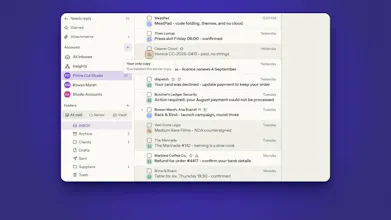
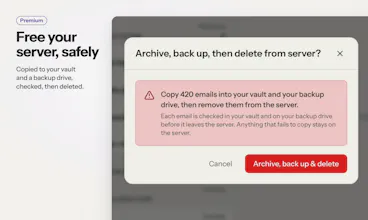
MailVault is a full email client with a vault behind it. Read, search and reply like in any client, while every message you keep is saved to your own disk as a plain .eml file. Delete it from the server and your copy stays. Search 50,000 messages offline in under 15 ms. Clear the server without losing a thing. No account, no telemetry, passwords in your OS keychain, AI that can run on your own machine. Gmail, Microsoft 365, Outlook.com and any IMAP. macOS, Windows, Linux. Core is free.




Free
Launch tags:Email
Launch Team
Hi Product Hunt 👋 Rokas here, maker of MailVault. I've been building software professionally for 14+ years, including as a developer at NordVPN and NymVPN, so privacy isn't a feature I bolted on. It's how I build.
Why I built it
Most of us keep ten or more years of receipts, contracts, offer letters and family photos in an inbox we don't actually own. One lockout, a free tier that shrinks, or an app that shuts down (Notion Mail closed last month) and that history is gone or behind a paywall. Your email provider is not a backup. I wanted a client where keeping your own copy isn't a separate chore. It just happens while you read.
What I looked at, and what I took from each
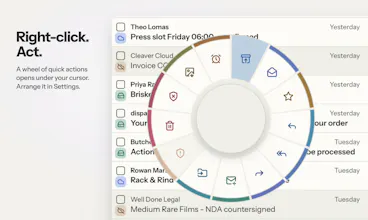
- Thunderbird: proof that a desktop client can keep mail on your own machine. I borrowed its good habits (a deleted folder goes to Trash, its quick actions are a preset), but every message is its own plain .eml file, so one damaged file never takes a whole mailbox with it.
- Apple Mail: the calm of a native client. But it's Mac only, and its mail store is tied to Apple Mail.
- MailStore Home: great at archiving, but Windows only and a separate app from the one you read mail in. MailVault is both in one.
- Superhuman and Shortwave: showed that email can be fast, keyboard driven and smart. MailVault keeps the speed (offline search over 50,000 messages in under 15 ms, custom shortcuts), but AI can run on your own machine and there is no server of mine in the middle.
What it does
- Every message you keep is saved to your disk as a plain .eml in Maildir, readable by Thunderbird, Apple Mail or grep
- Each row shows where a message lives: on the server, in your vault, in both, or only on your disk
- Delete from the server and your copy stays
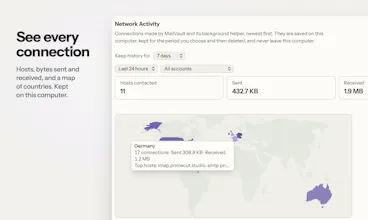
- No account to create, no telemetry, passwords in your OS keychain, tracking pixels flagged on every message
- Gmail, Microsoft 365, Outlook.com and any IMAP server, on macOS, Windows and Linux
Want to look around before installing? Try the live demo in your browser: https://mailvaultapp.com/demo/?ref=producthunt
The full mail client and manual archiving are free forever. Premium adds scheduled backups, Time Capsule snapshots, cleanup rules and more.
One question for you: what would it take for you to trust a mail app with fifteen years of your email? I'm reading every comment today.