
MailCode
Exchange, M365 and IMAP mail kept on your own disk
3 followers
Exchange, M365 and IMAP mail kept on your own disk
3 followers
Exchange, Microsoft 365 and IMAP in one window, with every message archived on your own disk. Import the PST and OST files nothing else opens, search 280,000 messages in milliseconds, flag what needs an answer. One-time purchase, no subscription, no server of ours in the middle.





What is new, improved and fixed in V 1.12.0
NEW — Summary: what today brought, and what it wants from you
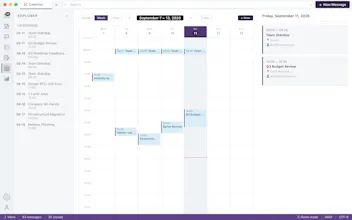
A new view, and the counterpart of Analytics: how much arrived today and how that compares with your own last seven days, who sent it, which conversations moved — and then the mail itself sorted by what it wants from you: needs a reply, waiting on them, invitations, for information, automated. Beside it, your flags, the mail waiting to go out, and today's meetings. Almost all of that sorting is read off the mail on your own Mac; the part that is not stays off unless you supply your own AI key.
NEW — Name the file in the sentence that talks about it
A letter carrying nine attachments leaves the reader to work out which is which. Type § in the composer — or drag a file's chip into the text — and the file's own name goes into the sentence, with a numbered Attachments list at the foot of the letter if you want one. Take the file off the letter and the reference that named it turns red, heals itself if you attach it again, and asks once before the mail goes out pointing at something it is not carrying.
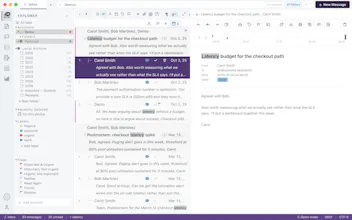
NEW — A line of the message under every row
The ≡ chip in the list toolbar puts one or two lines of each message under its row, in every grouping. Settings ▸ Read adds a Read text colour beside the unread one, so read and unread mail can differ by colour alone.
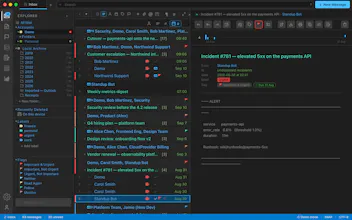
NEW — Five palettes, where there were two
Dark+ and Light+ changed the ground and nothing else. Settings ▸ Appearance now offers Syntax Dark and Syntax Light, which are what those two were; Quiet Dark and Quiet Light, which draw a message list in one ramp of grey and leave colour to the things that use it to mean something; and Paper, the palette from the website.
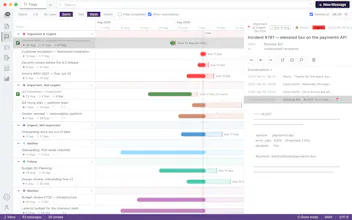
IMPROVED — The Flags timeline reads like a timeline
Every bar carries its own date beside it — "due 8 Sep", "done 2 Sep (2d early)", "due 4 Sep · 3d over" in red — instead of leaving you to count it off the ticks along the top. The work done now sits inside the plan it belongs to, so an overrun visibly pokes out of it.
IMPROVED — A sample inbox with a conversation worth the name
Open MailCode without adding an account and it starts in Demo mode, on a sample inbox that never touches the network. It now holds conversations of seventeen and sixteen messages, each forking three times, so the reply arcs, the fork marks and the conversation timeline have a real shape to draw before you have connected a mailbox of your own.
FIXED — Removing a mailbox removes all of it, and the disk space comes back
Mail you had deleted was kept so it could be brought back, and that copy — the message and the full bytes of every attachment on it — outlived the mailbox it belonged to: on one archive 2.06 GB, filed under an account that no longer existed and shown nowhere. Removing a mailbox now takes its Recently Deleted mail with it, hands the space back to the disk as it goes, and says how much it freed.
FIXED — Read and unread keep up with Office 365
Mail marked read in MailCode could stay unread in Outlook on the web for minutes or for good, and mail read there took just as long to catch up here. A busy mailbox's refusals no longer spend the few attempts a flip is given, reading through a run of mail travels as one instruction instead of one per message, and MailCode now polls IMAP accounts for flag changes every twelve seconds.
FIXED — Open an attachment from a message you opened as a file
The window a .eml or .msg opens into now offers View, Open and Download like the reading pane, instead of a single Open that ran the preview — and Open no longer removes the file it just handed to the application. Translation reaches that window too.
FIXED — A reply arc across a long conversation looks like one
The arc from a message to the one it answers was drawn to the same narrow width however far apart the two rows sat, so across a long thread it came out as a vertical line with a bend in it. The bow now widens with the distance it crosses.
Five weeks ago I posted about MailCode 1.12. It's now at 1.14.1, and these are the changes that matter most:
It runs on Windows. The installer and app are signed, so Windows no longer warns you about an unrecognised app. You get a 14-day trial, then a licence key that covers 2 PCs.
AI that stays on your machine. Settings → AI → Local works with Ollama, LM Studio, Jan or llama.cpp. Summaries, drafts and translation all run on your own computer, so none of your mail goes to a cloud provider. AI Assist can also write a reply in the sender's own language and tone, and you can refine the result by asking for changes, like "less formal".
Gmail works properly. Sign in with one click, with no Google Cloud project to set up. Labels sync both ways with Gmail on the web and on your phone. Meeting invitations you send from Gmail now reach the people you invite.
Compose does more:
• A sketchpad with flowcharts, dimension lines, rulers and snapping, for when a drawing explains it faster than a paragraph
• Checklists that recipients can see
• Tables with per-cell borders and a sum worked out for you
• Any attachment sent as a cloud link, whatever its size
• "Mark" a passage in a mail, and it's underlined in your reply's quote so you can answer each point where it stands
Bring your old mail with you. It imports Apple Mail and Thunderbird mailboxes, opens winmail.dat files, and shows Outlook Rich Text bodies that used to show up blank. Everything you import is searchable along with the rest of your mail.
Security has been tightened. Every mail connection now checks the server's certificate. A remote server that won't encrypt the connection never gets your password. AI keys are stored in the system keychain.
Mac and Windows. Link in the first comment.
Added analytics to version 1.11.0