
Mac Developer Bridge
Give ChatGPT a real terminal on your Mac
38 followers
Give ChatGPT a real terminal on your Mac
38 followers
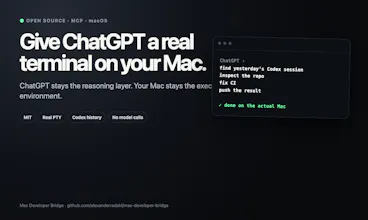
Open-source MCP bridge that lets ChatGPT operate your actual Mac: shell, files, real PTY sessions, background jobs, and read-only Codex history. ChatGPT stays the reasoning layer; your Mac stays the execution environment. MIT licensed and intentionally not sandboxed.




@alexander_benz Let's see if I've got what you're doing here before I go diving into this repo. First, open-source? You're already "plus ten" in my book. Ok. So, I often have long, detailed, conversations with ChatGPT when she it tied into my github repo. I have codex running in the app. So I totally get the notion of having ChatGPT do all the brain power and then what I have her do is give me the detailed, maybe one-shot, prompt to get stuff done in Codex with those prompts sometimes going for 20 minutes of execution. Then ChatGPT, via looking at Github, can review the work and create the next codex prompt. Codex is arms n legs, ChatGPT is the brain. It let's me use cheap model in Codex and the latest in my 20 dollar ChatGPT subscription.
So, are you essentially saying, why do the codex part, have chatgpt do what I do now but THEN kick it over to the MCP server to execute on whatever? Do I have that right?
@rick_segal1 Yep — you’ve got it. That’s basically the exact loop I was trying to collapse.
Today yours is:
ChatGPT → writes a detailed Codex prompt → you hand it to Codex → Codex executes on the Mac → ChatGPT reviews GitHub → repeat.
With the bridge it can be:
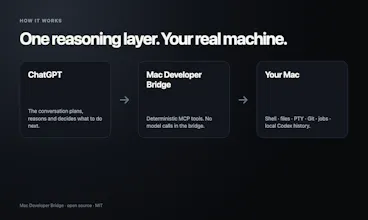
ChatGPT → MCP → your actual Mac.
So ChatGPT can inspect the live repo, read/write files, run shell commands and tests, use a real PTY, and keep a 20-minute job running itself. The bridge makes zero model calls; ChatGPT is still the brain and the Mac is the execution environment.
The one nuance: I’m not trying to remove Codex. You can absolutely keep using it when you want a coding agent. The bridge can read persisted Codex history, but it deliberately cannot start Codex turns, so Codex becomes an optional specialist rather than the mandatory relay for every action.
That also means you can choose when another model turn is actually useful versus something deterministic like inspecting a file, running tests, checking git state, or invoking a CLI. I wouldn’t frame it as bypassing any usage limit — it just removes the unnecessary relay step.
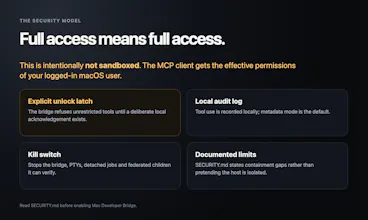
Big caveat: direct MCP execution is intentionally not sandboxed, so when it’s unlocked it has the permissions of your logged-in macOS user.
Your “Codex is arms n legs, ChatGPT is the brain” framing is pretty much the mental model that led me here — I just wanted the brain to be able to move the arms and legs directly too.
@alexander_benz This is a very very interesting idea. I'm going to mess around with it and will give you some feedback over on github. Nice answer, well done! Gotta love Norway.