@sourabh_asawa1 thanks! Looks interesting! I'll take a deeper look in upcoming days
Report
Wow. This is amazing. As a spatial sequence synaesthete this is how I actually experience time. Except more horizontal. I can’t wait to see how this app unfolds as I’ve always struggled with traditional calendars.
@nordous thanks Alex! If you have any feature requests – let me know
Report
Thanks so much for this beautiful app. The tag feature is still a little buggy (facing some problems when trying to view all tags, and also receiving error message when I try to delete tags I created). Also, the "Tasks" tab is weird. Things added there are not reflected on the timeflow, nor can I schedule my tasks from there. Pressing "enter" also creates an unnecessary blank task.
Still, I really like that we can plan by hours as well, like a regular planner and all my records can be tracked. It would be really great, if we can preview the broad task for the day, while planning the hourly tasks, or even drag and drop those tasks to "slot" into the hours. Please consider that feature! Some shortcuts (for adding tasks, moving to next day/hour etc.) would also be great.
Definitely see potential in this and will continue using it.
@lee_yi_wei hey! thanks! glad you like it!
On what device (model or screen dimensions in pixels) are you having these issues with viewing all tags? Tag deletion issue I will investigate, thank you! For now, you can try to reset local data. On mobile – open burger menu and click "reload app", on desktop – same button, but in your profile (click on the username/email in the top left corner).
For hourly planning – at the moment it has an hourly view, you can switch to that, click on hour 0, all tasks will be on it, and tap "reschedule all" button. This will allow you to set an hour for every task in one go. But I will think about a better approach definitely! Thanks a lot for raising this.
If you encounter any other obscurities – I'm willing to listen.
Thanks for the support 👍
Report
I’ve literally been ‘dreaming’ of this! Thank you for building it. This makes too much sense. Keep building!
@trellwest whoa, thanks Trell ❤️ ! You energise me with this!
We were dreaming together then. Spread the word.
Report
Thanks for this intriguing product!
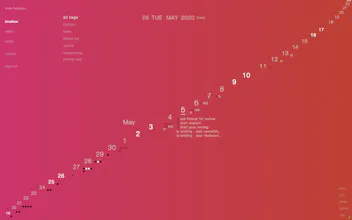
What I like the most about the special calendar is various color sets, which itself can absolutely break an old and monotone concept of planning. The stream of time on index brings me freshness when inputting daily todos into it.
I make a lot of notes carrying my phone around so focused on the Note page UI. I think it would be very nice if (+) button on the far left side can come a little closer to the center -I'm right-handed using Galaxy Note 9, FYR- and if the more top margin could be added in full screen mode of note-making to avoid blocking a view by any phone notifications.
Loved it overall and would highly recommend to every dreamers. Good luck!
@goldenpothos hi Amber! Thanks for both the praise and feedback ❤️😌
I agree, notes UX deserves more attention. I'm thinking about moving or repeating "+" button on the top.
Report
One thing that matter most to me as consumer is the UX and couple that with a minimal UI; Jackpot. Lightpad did just that. Lightpad I think was the missing link in my project / task management. A simplistic and visual redefined calendar is just what one needs in the plethora of task management apps around us. Would recommend if one needs to manage tasks for a day using a focussed & visual approach.




Lightpad
Lightpad
Lightpad
Lightpad
Lightpad
Lightpad
Lightpad