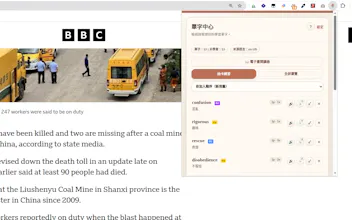
Translate and save words without leaving the page, keep their original context, and see them highlighted when they appear again. Language Annotator also supports PDF, EPUB and MOBI reading, vocabulary management, and practice.
Hi Product Hunt!
I built Language Annotator because the usual vocabulary workflow felt broken: I would look up a word while reading, understand it for a moment, and then forget it.
Language Annotator connects those steps into one reading workflow. You can translate text in place, save a word together with its real sentence, and automatically see that word highlighted when it appears again in a later article or book. That repeated exposure in new contexts is the part I personally wanted most.
The extension also includes a vocabulary manager, practice mode, and an ebook reader for PDF, EPUB and MOBI files. It currently supports 11 interface languages and does not collect or use personal data.
I would especially value feedback on the reading experience and on which practice features would make saved vocabulary more useful over time.
Report
The in-context highlighting is honestly the standout feature for me, makes new words stick way better than flashcards. Reader support across pdf and epub is a nice bonus too.
Report
honestly the best part is how the highlights stay tied to the original context when you save a word, makes reviewing later actually useful instead of just a random vocab list
Report
No reviews yetBe the first to leave a review for Language Annotator
The in-context highlighting is honestly the standout feature for me, makes new words stick way better than flashcards. Reader support across pdf and epub is a nice bonus too.
honestly the best part is how the highlights stay tied to the original context when you save a word, makes reviewing later actually useful instead of just a random vocab list