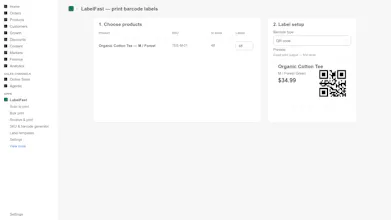
LabelFast prints barcode labels for your Shopify products. Label quantities default to the stock you actually have on hand, so you print one label per unit without counting by hand. It supports 8 barcode types including QR and Data Matrix, and it prints from a scan, in bulk, or directly from Shopify's native inventory transfers. Templates cover Avery, DYMO, and Zebra sheets and rolls. There is a built-in SKU and barcode generator for products that do not have codes yet.
No reviews yetBe the first to leave a review for LabelFast
Maker
📌
Hi Product Hunt, I'm Ole, I build small software at Advira and LabelFast is one of them.
I made this because printing barcode labels for a Shopify store was more annoying than it should be. You end up typing quantities that you already know from your stock levels, and the label templates never quite line up with the sheets you bought. So LabelFast defaults label quantities to stock on hand and includes real templates for Avery, DYMO, and Zebra, plus custom sizes if your labels are odd. You can print from a scan, in bulk, or straight off an inventory transfer, and it can generate SKUs and barcodes for products that do not have them yet.
There is also a timing reason. Shopify's Stocky app shuts down on August 31 2026, and a lot of barcode apps print their purchase-order labels through Stocky, so that workflow stops when Stocky closes. Native purchase orders are not in Shopify's public API, so apps cannot just rebuild that. LabelFast takes a different route and prints from Shopify's native inventory transfers, which are not going away. If you are a merchant who has been printing labels off Stocky, that is the gap this fills.
It is read-only by default, so it will not change anything in your store unless you tell it to. Free plan is 200 labels a month if you want to try it on real products. Happy to answer anything about barcode types, label sizes, or the Stocky situation in the comments.
Report
does it handle variants correctly, like if i have a t-shirt in 5 sizes and 3 colors does each sku get its own label or do i have to separate them by hand
Report
Maker
@ouzakmanso3g Yes! Variants are the unit LabelFast thinks in, so pick that t-shirt in the product picker and it expands to all 15 size/color combinations automatically. Each variant gets its own label with its own SKU, its own barcode (whatever's in the variant's barcode field in Shopify), its own price, and the variant name printed on the label ("M / Red").
Quantities also default per variant from your live stock, so if you have 4 of M/Red and 7 of L/Blue, you get 4 labels and 7 labels queued without typing anything (all editable before printing). And if some variants don't have barcodes yet, the built-in generator creates unique codes for exactly the ones missing them.
does it handle variants correctly, like if i have a t-shirt in 5 sizes and 3 colors does each sku get its own label or do i have to separate them by hand
@ouzakmanso3g Yes! Variants are the unit LabelFast thinks in, so pick that t-shirt in the product picker and it expands to all 15 size/color combinations automatically. Each variant gets its own label with its own SKU, its own barcode (whatever's in the variant's barcode field in Shopify), its own price, and the variant name printed on the label ("M / Red").
Quantities also default per variant from your live stock, so if you have 4 of M/Red and 7 of L/Blue, you get 4 labels and 7 labels queued without typing anything (all editable before printing). And if some variants don't have barcodes yet, the built-in generator creates unique codes for exactly the ones missing them.