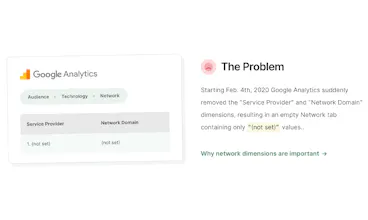
On Feb. 4th, 2020 Google Analytics suddenly removed the "Service Provider" and "Network Domain" dimensions, resulting in an empty Network tab containing only "(not set)" values.. IpMeta adds them back into Google Analytics for you. 100% free, forever.
No reviews yetBe the first to leave a review for IpMeta
Hi Jerre, your product is close to perfect, but in Google all the traffic coming from Romania's biggest internet provider, RCS&RDS, was labeled as 'rcs&rds business' (mostly businesses), 'rcs&rds residential' (mostly residential traffic), 'rcs&rds sa' (not sure, maybe public networks) and 'rcs&rds mobile' (4G phones). Your product only shows RCS & RDS. Maybe has something to do with the block names?....
Report
Maker
@luciansarbu Thanks for the feedback Lucian! Much appreciated. Will look into this to see if I can make it more accurate :)
Report
Last question. is IpMeta Service provider working on Google Analytics for android? I can't find it. Thanks.
Report
Maker
@jean_marc_caimi Yup! But like @luciansarbu mentioned, you'll have to change the Network report to make use of the new 'IpMeta Service Provider' dimension instead. Here's how:
1. Go to 'Audience' -> 'Technology' -> 'Network'.
2. Click the 'Edit' button in the top right.
3. Under 'Dimension Drilldowns', replace the two 'Service Provider' dimensions with the 'IpMeta Service Provider'.
4. Click 'Save'.
This won't affect the original Network tab under 'Audience' -> 'Technology' -> 'Network', instead a new Custom Report will be created for you under 'Customization' -> 'Custom Reports' -> 'Network'.
Report
Excellent product, it really works. But since using it, my website's bounce rate has dropt from 80% to 10%.
I install this plugin by GTM, and I guess the custom event in trigger makes GA think the visit is an Interaction Hit. And I can do nothing about it.
Report
Maker
@mcc_xinhai Whoops, I wasn't aware of this! Thanks for reporting, I'll check to see if I can find a solution for that problem.
@mcc_xinhai you can set the hit to 'non-interactive' in GTM which will resolve your bounce rate issue. However, a bigger problem for me is that the even fires on every single pageview, sending a TON of events to my GA. Has anyone figured out a way to ensure the hit only fires once per session?
Report
Hello @jerre_baum ,
First of all let me thank you for this iniciative and to came with the plugin.
I'm trying to have this working and for some reasonI'm not getting any data on analytics nor error message.
I have tried the steps that you suggest on the website with no luck, unfortunately.
Any idea?
My website is the following karditor.com
Thanks
Report
Maker
Hi PH!
As you may be aware, Google has quietly removed the 'Service Provider' and 'Network Domain' dimensions from Google Analytics.
This is quite a big issue for many people who are making use of these dimensions to filter out bot traffic or identify companies/universities who are browsing your site. I was personally also making heavy use of these dimensions, so I made a GA plugin to get the dimension back into my GA accounts.
I guess a lot of other people could benefit from this too, so I have published the plugin. It's 100% free forever, without any limitations. I would love some honest feedback :)
I've added some notes on how I am personally using the new IpMeta dimensions below.
----------
### Getting back the Network tab
I wanted to have a report like the one we used to have under 'Audience' -> 'Technology' -> 'Network', so I re-created it as a Custom Report. Here's how to do it:
1. Go to 'Audience' -> 'Technology' -> 'Network'.
2. Click the 'Edit' button in the top right.
3. Under 'Dimension Drilldowns', replace the two 'Service Provider' dimensions with the 'IpMeta Service Provider'.
4. Click 'Save'.
This won't affect the original Network tab under 'Audience' -> 'Technology' -> 'Network', instead a new Custom Report will be created for you under 'Customization' -> 'Custom Reports' -> 'Network'.
### Updating existing Filters
I was making use of the Service Provider dimension to filter out bot traffic and internal traffic. Here's how I was able to fix them:
1. Go to 'Admin' -> 'Account' (first column) -> 'All Filters'
2. Update all filters that are currently making use of the Service Provider or ISP domain dimensions to instead use the custom 'IpMeta Service Provider' and 'IpMeta Network Domain' dimensions.
3. Done!
### Identify business visitors
IpMeta includes a bonus dimension that wasn't available in Google Analytics before. This dimension is called 'Network Type', which can have a value of either 'business', 'educational', 'spider' or 'isp'. The original Network tab used to include a lot of ISP data that was hard to filter out if you'd like to get a list of just commercial companies visiting your website, with this new dimension it's very easy:
1. If you've followed along with the 'Getting back the network tab' step above, you can now navigate to: 'Customization' -> 'Custom Reports' -> 'Network'.
2. Click on the 'Secondary Dimension' dropdown, and select the 'IpMeta Network Type' dimension.
3. Click 'advanced' and configure a filter with the following settings:
'Include' -> 'IpMeta Network Type' -> 'Containing' -> 'business'
4. Click 'Apply'.
This will filter out all the ISPs, crawlers/spiders and college/university networks to provide you with a clean list of just companies who have visited your site. If you'd like a list of just the universities that visited your site, you can update the filter to 'Containing' -> 'Educational', etc.
Report
@jerre_baum thank you for putting this together and making it available, super useful! I am currently testing on our website in staging and don't seem to be getting a value for network type.. instead I get this: (not set) [Requires free API key - see ipmeta.io]
I have created an account and an API key and included it in the code exactly as per the instructions and I have not missed a comma.. does that mean the key expired or something?
Any suggestions..?
Again, thanks and keep up the good work!
Julian
Report
Maker
@julian_erbsloeh Hey Julian! Thank you for giving IpMeta a try :)
API tokens are scoped to the domain you generate them for. Sounds like your staging environment is under a different domain than the domain the API key was generated for.
Can you generate a separate key for the staging env to see if that resolves the issue?
Report
@jerre_baum that's exactly it.. but this also means that for my website, where the user moves between www. and ticketing. as well as blog. I need three API keys and I need to add a different one to each subdomain?
Report
Maker
@julian_erbsloeh Great!
Nope: as long as you have generated the API key for the main domain (with or without www. prefix, so: www.example.com or example.com) it should automatically work for example.com and all subdomains under example.com.
That said, if you were to generate one for a specific subdomain (ex: ticketing.example.com or staging.example.com) it won't work under other subdomains.
I believe the problem you ran into earlier was actually due to having generated an API key for the .com version of your domain, while you were trying to use on the .co.uk version.
Anyways, you should be good now! :)
Report
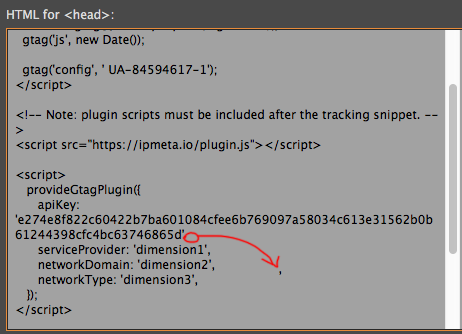
Hi @jerre_baum many thanks for your quick reply, I really appreciate it. So, I just have to put a comma at the end of the Key line? Please see the picture of my code:
Report
Just found a compatibility issue when using the plugin.js in IE11. Did anyone run into the same error? Will you consider to support some old-fashioned browsers like IE11?
-- Updated July 6, 2020
This issue has been fixed by Jerre. Thanks for that.