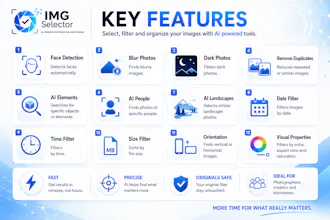
IMGSelector is a Windows tool that helps photographers, designers and creators select, filter and organize large photo collections faster. It uses built-in offline AI filters to detect faces, blurry or dark photos, duplicates, people, elements and landscapes. After installation, it works without internet. This free 7-day Trial is available now, and I’m looking for real user feedback.
No reviews yetBe the first to leave a review for IMGSelector
Maker
📌
Hi everyone,
I’m the creator of IMGSelector.
I built this tool because selecting photos manually from large folders can take a lot of time, especially when there are hundreds or thousands of images, duplicates, blurry photos, dark photos or many similar shots.
IMGSelector is a Windows software that helps users select, filter, clean and organize photo collections faster using technical, visual and built-in offline AI filters.
It works without internet after installation, because the AI engines are included in the application.
This is the free 7-day Trial version, and I’m especially looking for honest feedback from photographers, designers, content creators and anyone who works with many images.
I’d really appreciate your thoughts:
- Was it easy to install?
- Was it useful?
- Which filters worked best for you?
- What should be improved?
- Would you use something like this in your workflow?
Thank you for testing IMGSelector.
Report
How accurate is the face detection on group shots with partial occlusions, like someone wearing sunglasses or a hat? And does the duplicate finder work on visually similar but not identical images, or only exact copies?
Report
Curious how well the offline AI handles large batches — like a wedding shoot with thousands of photos, does the duplicate and blur detection still hold up speed-wise without an internet connection?
Report
Offline AI filters like these are usually a hit or miss, but the duplicate detection worked surprisingly well on a messy folder I tested. Curious how it handles larger libraries though.
Report
Offline AI filtering for big libraries sounds genuinely useful, especially the duplicate and blur detection. One thing that would make it stick for me is adding a quick preview overlay so I can see thumbnails of the matches before confirming bulk moves or deletes, instead of trusting the filter blindly.
Report
Tried it on a folder of around 2,000 wedding shots and the face detection picked up guests I hadn't even tagged yet. Offline mode is a nice touch for working on location without spotty wifi.
Report
the offline face and duplicate detection actually pulled its weight on a messy folder of wedding shots i forgot to sort, surprised how fast it scanned everything without an internet connection.




How accurate is the face detection on group shots with partial occlusions, like someone wearing sunglasses or a hat? And does the duplicate finder work on visually similar but not identical images, or only exact copies?
Curious how well the offline AI handles large batches — like a wedding shoot with thousands of photos, does the duplicate and blur detection still hold up speed-wise without an internet connection?
Offline AI filters like these are usually a hit or miss, but the duplicate detection worked surprisingly well on a messy folder I tested. Curious how it handles larger libraries though.
Offline AI filtering for big libraries sounds genuinely useful, especially the duplicate and blur detection. One thing that would make it stick for me is adding a quick preview overlay so I can see thumbnails of the matches before confirming bulk moves or deletes, instead of trusting the filter blindly.
Tried it on a folder of around 2,000 wedding shots and the face detection picked up guests I hadn't even tagged yet. Offline mode is a nice touch for working on location without spotty wifi.
the offline face and duplicate detection actually pulled its weight on a messy folder of wedding shots i forgot to sort, surprised how fast it scanned everything without an internet connection.