Launching today

HushCall
Privacy-First Meeting Recorder & On-Device AI for macOS
2 followers
Privacy-First Meeting Recorder & On-Device AI for macOS
2 followers
A meeting recorder for Mac that records calls by itself, then transcribes, summarizes, answers questions and searches what was on screen. On-device by default.



Free Options
Launch Team

CloudflareYour next app belongs on Cloudflare Workers. Deploy for free
Promoted
Hi Product Hunt, I'm Bala, the maker of HushCall. 👋
HushCall is a Mac app that records your meetings and writes the notes for you. It runs on your Mac, so your calls stay private. No bot ever joins your call.
Here's what makes it different:
🔴 Records by itself
Turn on auto-record and HushCall notices when a call starts in Zoom, Teams, Meet and other apps. It starts recording on its own and saves when the call ends. You never have to remember to press record.
📅 Meeting reminders
Get a reminder before each meeting on your calendar. Click Join & Record and you are in the call and recording at once. The recording is named after the event.
🤖 No bot in the call
It records from your Mac, so nobody sees a "notetaker has joined" guest. You and the other side are saved as two clear tracks.
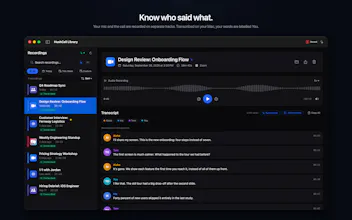
🗣️ Knows who said what
Speakers get real names, not "Speaker 1". HushCall uses the participant list in Zoom, Teams and Meet when it can, and it learns people's voices over time, so names carry over to new calls and old recordings.
🖼️ Slides, captured for you
When someone presents a deck, HushCall turns it into a slide-by-slide gallery with the text on each slide. Click a slide to jump to that moment in the call.
🖥️ Shared screens, captured too
When someone shares a desktop, a terminal or a dashboard, HushCall saves the key screens as pictures with a short label, so you see exactly what was shown.
📋 Copy what was on screen
IDs, commands, links and keys shown on screen are pulled out into a Key Details list. Copy them in one click, spelled exactly right, instead of trusting a transcript that misheard them.
🔎 Search by what you saw
One search box finds words from the call, slides and on-screen text. Click a result to jump to that moment.
🔒 Private by default
Transcripts and AI run on your Mac. Cloud is optional, and only if you choose it.
📝 Summaries your way
Pick a template like Interview or Standup, or make your own. You also get action items for each meeting.
⚡ Live recap
Optional. A small panel shows a running summary during the call. It is not shared and not in the recording.
✍️ Quick notes
Press Option + Command + N during a call to add a note at that exact moment. You can paste a screenshot too.
💬 Ask anything
Chat with one meeting or all of them. Connect HushCall to Claude, Cursor and other AI apps, or use Shortcuts and Spotlight.
💰 Pricing
Free to record and play back. Pro is $9.99 a year with a 7-day free trial, or $19.99 once for lifetime. Pro adds transcripts, summaries, action items, chat and video search.
I'd love your feedback:
• Which meeting apps and languages matter most to you?
• What would you want from your summaries?
I'll be here all day to answer questions. Thank you!