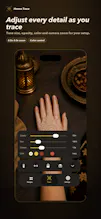
HennaTrace turns your iPhone camera into a live mehndi tracing guide. Pick a transparent design, place your hand under the camera, then adjust size, rotation, opacity, color, mirror and zoom until it fits naturally. Auto Fit uses on-device hand detection to help align patterns. Start with free templates, preview and save your result, or unlock Pro designs and import your own transparent PNG or line art. Camera and photo processing stay on device.
Hi Product Hunt! 👋 I built HennaTrace after seeing how hard it is to transfer a detailed mehndi reference onto a real hand while keeping proportions and placement consistent.
The app uses the iPhone camera as a live tracing guide: choose a design, position your hand, and adjust the overlay until it fits. I also added an optional on-device Auto Fit mode to speed up placement, while keeping manual controls for the details that matter.
HennaTrace includes free starter designs, with Pro libraries and custom PNG or line-art import for people who want more flexibility. Camera and photo processing stay on device.
I’d especially love feedback from henna artists and learners: where does tracing feel hardest today—placement, scale, keeping the hand steady, or adapting a design to different hand shapes?
Report
Finally tried this on my own hand and the auto fit actually caught my fingers pretty well, which I did not expect. The opacity slider made it way easier to line up fine lines without losing sight of my skin underneath.
Report
this looks genuinely useful, especially the on-device processing part which is kind of rare these days. one thing though, it would be awesome if you could record a short timelapse of the application process, basically capturing each stage so you can share the full journey on instagram or whatever. could really help with tutorials too
Report
No reviews yetBe the first to leave a review for HennaTrace
Finally tried this on my own hand and the auto fit actually caught my fingers pretty well, which I did not expect. The opacity slider made it way easier to line up fine lines without losing sight of my skin underneath.
this looks genuinely useful, especially the on-device processing part which is kind of rare these days. one thing though, it would be awesome if you could record a short timelapse of the application process, basically capturing each stage so you can share the full journey on instagram or whatever. could really help with tutorials too