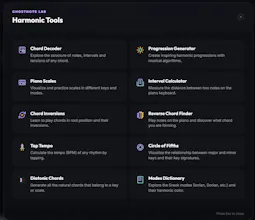
GhostNote is a browser-based, local-first music theory and practice workspace for musicians who want to understand harmony, not just memorize it. It brings together interactive tools for playing, analyzing, and practicing music in one place: virtual piano with Web MIDI support, chord progression tools, voice-leading analysis, and a structured practice academy. Runs fully in the browser and evolves through real user feedback into a complete music learning environment.
No reviews yetBe the first to leave a review for GhostNote
Maker
📌
Hey everyone 👋 I’m Santiago, the developer behind GhostNote.
GhostNote started as a personal tool to learn and practice music theory in a more interactive way, and it slowly grew into a browser-based workspace for exploring harmony.
It includes a virtual piano with Web MIDI support, chord progression tools, voice-leading analysis, and an interactive practice academy.
Everything runs locally in the browser, and I’m building it in public based on real user feedback.
Would love to hear thoughts from musicians, producers, and learners — especially what feels useful or missing.
Report
how does the local-first setup actually work if i want to switch between my laptop and phone without losing my practice history
Report
Maker
Hello@filizmzyd!, first of all I apologize for the delay in replying. That said, I hope it helps you
- How Ghost Note's local-first setup works:
Ghost Note is local-first: your projects, progressions, recordings, and settings are saved in IndexedDB (an in-browser database). There's no server, there's no account, there's no cloud, and everything stays on your device.
If your doubt is about Academy practices, this section still needs work but it would allow you to export recorded lessons and import MIDI.
-What if you want to use a laptop and cell phone?
There is no automatic synchronization between devices yet. Each browser/device has its own local database. You also have to consider that I am working on a good responsive layout so that it is manageable and useful from mobile devices but it still lacks a lot of polish so I recommend you use web desktop for now, if you enter by mobile device you will realize how badly made it is.
-Current alternatives:
Export/Import JSON, the most recommended because it allows you to save all the parameters.
In the Studio you can export your project as .json file. inside the "Share/Export Project" button in the banner where the tempo and instrument parameters are located on the far right. You send it to yourself by mail/cloud/WhatsApp/DRIVE and open it on the other device from the same button and import.
It's not automatic, but it works without a backend or account.
I am going to implement an improvement these days in the QR function so that it can be opened directly from mobiles with a scan, however this would have certain limits of shared data, on the other hand the export by JSON although it is complete requires users to do the process.
If you have any questions or find any bug/error in the app do not hesitate to comment on it, greetings!
Report
How does the local-first setup actually work if I want to keep my practice progress synced when I switch between my laptop and a tablet?
Report
Maker
Hello@dndjnxz!, first of all I apologize for the delay in replying. That said, I hope it helps you
- How Ghost Note's local-first setup works:
Ghost Note is local-first: your projects, progressions, recordings, and settings are saved in IndexedDB (an in-browser database). There's no server, there's no account, there's no cloud, and everything stays on your device.
-What if you want to use a laptop and cell phone?
There is no automatic synchronization between devices yet. Each browser/device has its own local database. You also have to consider that I am working on a good responsive layout so that it is manageable and useful from mobile devices but it still lacks a lot of polish so I recommend you use web desktop for now, if you enter by mobile device you will realize how badly made it is.
-Current alternatives:
Export/Import JSON, the most recommended because it allows you to save all the parameters.
In the Studio you can export your project as .json file. inside the "Share/Export Project" button in the banner where the tempo and instrument parameters are located on the far right. You send it to yourself by mail/cloud/WhatsApp/DRIVE and open it on the other device from the same button and import.
It's not automatic, but it works without a backend or account.
I hope I have expressed myself well and if you have more doubts or other questions do not hesitate to ask them greetings!
how does the local-first setup actually work if i want to switch between my laptop and phone without losing my practice history
Hello@filizmzyd!, first of all I apologize for the delay in replying. That said, I hope it helps you
- How Ghost Note's local-first setup works:
Ghost Note is local-first: your projects, progressions, recordings, and settings are saved in IndexedDB (an in-browser database). There's no server, there's no account, there's no cloud, and everything stays on your device.
If your doubt is about Academy practices, this section still needs work but it would allow you to export recorded lessons and import MIDI.
-What if you want to use a laptop and cell phone?
There is no automatic synchronization between devices yet. Each browser/device has its own local database. You also have to consider that I am working on a good responsive layout so that it is manageable and useful from mobile devices but it still lacks a lot of polish so I recommend you use web desktop for now, if you enter by mobile device you will realize how badly made it is.
-Current alternatives:
Export/Import JSON, the most recommended because it allows you to save all the parameters.
In the Studio you can export your project as .json file. inside the "Share/Export Project" button in the banner where the tempo and instrument parameters are located on the far right. You send it to yourself by mail/cloud/WhatsApp/DRIVE and open it on the other device from the same button and import.
It's not automatic, but it works without a backend or account.
I am going to implement an improvement these days in the QR function so that it can be opened directly from mobiles with a scan, however this would have certain limits of shared data, on the other hand the export by JSON although it is complete requires users to do the process.
If you have any questions or find any bug/error in the app do not hesitate to comment on it, greetings!
How does the local-first setup actually work if I want to keep my practice progress synced when I switch between my laptop and a tablet?
Hello@dndjnxz!, first of all I apologize for the delay in replying. That said, I hope it helps you
- How Ghost Note's local-first setup works:
Ghost Note is local-first: your projects, progressions, recordings, and settings are saved in IndexedDB (an in-browser database). There's no server, there's no account, there's no cloud, and everything stays on your device.
-What if you want to use a laptop and cell phone?
There is no automatic synchronization between devices yet. Each browser/device has its own local database. You also have to consider that I am working on a good responsive layout so that it is manageable and useful from mobile devices but it still lacks a lot of polish so I recommend you use web desktop for now, if you enter by mobile device you will realize how badly made it is.
-Current alternatives:
Export/Import JSON, the most recommended because it allows you to save all the parameters.
In the Studio you can export your project as .json file. inside the "Share/Export Project" button in the banner where the tempo and instrument parameters are located on the far right. You send it to yourself by mail/cloud/WhatsApp/DRIVE and open it on the other device from the same button and import.
It's not automatic, but it works without a backend or account.
I hope I have expressed myself well and if you have more doubts or other questions do not hesitate to ask them greetings!