@swinterroth is correct! That's one of the most compelling features of our product @udimov - we keep all your contacts from different accounts and devices in sync. If you need any help getting setup, I encourage you to sign-up for our free concierge onboarding that is available to all FullContact users (even those on our basic free plan!) - https://www.schedulicity.com/sch...
Report
Is this paid? I seem to read people saying its kind of pricy and you download it for free
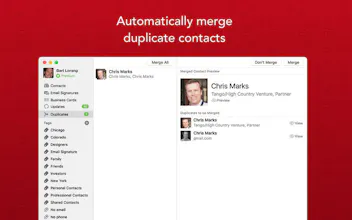
@andrealbuq94 - we offer a free basic plan in addition to our paid plan (https://www.fullcontact.com/apps...). Our basic plan allows one account to be set to 2-way sync as well as storage of up to 5,000 contacts. Our Premium users find a ton of value in our multiple sync features where we sync two or more Google, iCloud, or Exchange accounts together and keep them in sync regardless of where changes are made. Additionally, our Premium plan offers a unique feature called Email Signatures where users can opt-in to have us capture contact information from email signature blocks in Gmail and use this to update or create new contacts in FullContact. This is a huge time saver for many people! If you're interested in learning more, our Customer Success team offers free concierge onboarding - https://www.schedulicity.com/sch....
Report
Seems good but I would have liked a version without monthly/yearly subscription.
Hi @steveraffner - we offer a basic free plan as well - you can store up to 5,000 contacts and sync one account (Google, iCloud, or Exchange). You are welcome to connect more than one account but the information will only two-way sync with your account in the "Sync" mode. Hope that helps! Here is more information about our pricing options: https://www.fullcontact.com/apps.... Happy to answer any other questions you may have!
This software is asking for your iCloud password. I think this is not safe.
Report
@udimov Hi Dmitrii the password is only required if you would like to sync your iCloud contacts to FullContact. Otherwise it is not required.
Report
@udimov To be clear, we don't hold on to your password, we exchange it for a token to interact with iCloud. We'll be supporting iCloud app-specific passwords soon.
Report
Works good so far but a bit expensive I must say..
@carlzeta - glad it's working well for you. I'm sorry to hear you are disappointed with our pricing. We offer a free basic plan in addition to our paid plan (https://www.fullcontact.com/apps...). Many users are looking to sync two or more sources (Google, iCloud, Exchange) together, which can be labor intensive on our servers. For this reason, the multiple sync is currently a paying feature only. Our Premium users find a ton of value of us doing the work to have a unified contact list across accounts and devices regardless of where changes are made. In the future, we are considering adding an additional pricing tier for people who are using less of the current feature set. Thanks again for providing your feedback!
Report
@jessicahnolan thx for the reply, yes i'm using the premium for all services to be synced, but still. ;)
@swinterroth - I'm sorry to hear that you've experienced slowness with the app. Please do us a favor and use the "Send Feedback..." option from the FullContact menu to send us your logs. We want to investigate ASAP to resolve any possible issues. Thanks for your support of FullContact! We are excited to continue to develop new features for this product! Let us know what you'd like to see next! :)




Topvisor
FullContact for Mac
FullContact for Mac
FullContact for Mac
Topvisor
FullContact for Mac
FullContact for Mac
FullContact for Mac
Relayo
FullContact for Mac