Advanced Name Manager and Formula Manager for Excel allows you to change name scopes, list all formulas, defined names, and table names, update names and formulas in a batch, …
👋 Hi Product Hunt community!
As an Excel developer and financial modeler, I’ve spent far too many hours fixing broken references (#REF!), hunting down hidden named ranges, and manually generating dozens of sequential formulas. Excel’s native Name Manager simply wasn't built for modern, large-scale financial models or complex enterprise spreadsheets.
That’s why we built Formula Manager for Excel—a dedicated add-in designed to give advanced Excel users full structural control over their workbooks directly from a custom ribbon tab.
Here is what makes it different:
🔍 Explorer & Dependency Tracking: Search every defined name, range formula, and table name in a central grid. Instantly trace two-way relationships with dedicated "Referred By" and "Refers To" panels.
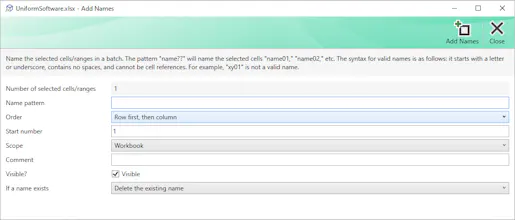
⚡ Pattern-Based Batch Naming: Generate or update dozens of range names or formula patterns in seconds using sequential wildcards (e.g., Region??).🩺 Deep Structural Auditing: Isolate unused names, 3D ranges, external links, relative references, and broken formulas across your entire workbook.
📝 Bulk Edit via Import/Export: Export all name definitions to a clean grid worksheet, edit them in bulk, validate syntax, and re-import.
🛡️ Safety First: Built-in automated backups create timestamped copies before any bulk operation, so you never risk losing data.We’d love for you to give it a spin! We offer a fully functional 7-day free trial, and we're eager to hear your feedback, feature requests, and thoughts in the comments below!
Happy modeling! 📊🚀