
Follow-up Invoices
Get paid faster. Stop chasing invoices by hand.
7 followers
Get paid faster. Stop chasing invoices by hand.
7 followers
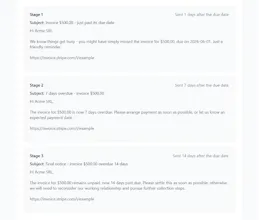
Most invoice-chasing tools (Chaser, Upflow) are built for enterprise AR teams and priced accordingly. Follow-up Invoices is built for small businesses: upload a CSV or sync from Stripe, and 3 pre-written reminder emails (friendly, firm, final notice) go out automatically — only during business hours you set. Real Stripe payment links, a dashboard that leads with "recovered this month," and 5 languages. Free tier included, paid plans start at $15/mo.


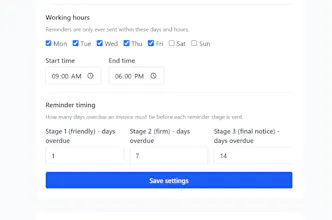


A nice straightforward tool, love the business hours setting. One thing that would make it way more useful for me would be the ability to exclude certain customers from automated reminders — we have a couple of long term clients who always pay late but on their own schedule, and I don't want to spook them with a "final notice" that we never actually mean. A simple whitelist or per customer override would solve it.
@sleymanbayrwcs Hi,
Thank you for trying it out, and for this suggestion! You've described the exact scenario I want to handle well: the long-term client who pays on their own rhythm, where an automated "final notice" would do more harm than good.
Good news: a per-client mute is now at the top of my roadmap — a simple "don't send automated reminders to this client" toggle that applies to all their invoices, current and future. The plumbing for it is already half-built, so expect it soon rather than someday.
Thanks again, this is exactly the kind of feedback that shapes the product.
@sleymanbayrwcs Update: it shipped! 🚀 Per-client muting is live — open any invoice row in the dashboard and hit "Mute client"; that client stops receiving automated reminders for all invoices, current and future. You can unmute anytime from Settings. From your comment to production in about an hour — thanks for the nudge!
Uploaded a test CSV and was surprised how fast the three preset reminders went out during the hours I picked. The dashboard putting "recovered this month" front and center is a nice touch for a small shop like mine.
@meryemdemi73015 Hi,
Thank you so much for taking the time to try it out and write to me — this genuinely made my day. Follow-up Invoices launched on Product Hunt just today, and yours is the first real feedback I've received.
Really glad the "recovered this month" number resonated with you. That was exactly the idea behind it: for a small shop, the question isn't "how many emails did we send" but "how much money actually came back."
One honest heads-up, since you tested with a CSV: when an imported invoice is already well past due (14+ days), the three reminder stages currently go out on consecutive hourly runs — so a test looks impressively fast, but a real client with an old invoice could get all three escalating emails within a few hours. I'm rolling out a fix shortly that enforces a minimum gap between stages, so imported backlogs get paced sensibly. Until then, if you import real overdue invoices, you may want to pause reminders on the oldest ones for a day or two.
If you run into anything else — confusing, broken, or just annoying — I'd love to hear it. Replies to this address reach me directly.
Thanks again for giving it a shot!
Finally tried this and the business hours scheduling alone is worth it, no more 2am awkward emails. Love that it pulls live Stripe links into the reminders so clients can pay without thinking.
@kuzeyvv1l Hi — thank you, this made my day! Business hours scheduling was one of those features I almost cut from the first version, so hearing it's the thing that won you over is really encouraging. And glad the Stripe payment links are doing their job — "make it one click to pay" was the whole bet.
If anything ever feels off — timing, wording of the reminders, anything — just reply here. Feedback like yours is literally shaping the roadmap right now.