
Fetchy: AI Usage Menu Bar
A reimagined AI usage tracker for your Mac menu bar
68 followers
A reimagined AI usage tracker for your Mac menu bar
68 followers
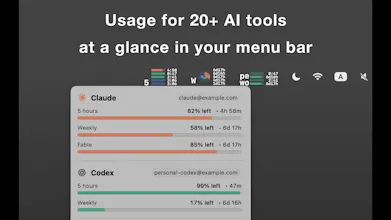
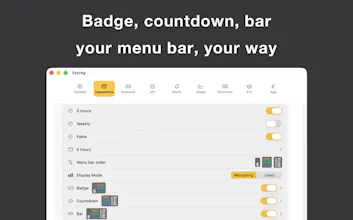
Fetchy is a customizable AI usage tracker for the Mac menu bar. Unlike simple quota monitors, it lets you choose how usage appears with bar, ring, pie, or number views, set custom limits for API-based workflows, and receive alerts at meaningful checkpoints. It supports multiple AI providers and is designed to make usage instantly understandable without interrupting your workflow.




Free Options
Launch Team / Built With


AWS Activate CreditsCredits that fuel your startup’s next milestone
Promoted
Hi Product Hunt! 👋 I’m Jeje, the solo developer behind Fetchy.
I built Fetchy after trying several AI usage trackers and realizing that most of them focused on showing numbers, but not on how people actually understand and act on those numbers.
I wanted usage information to be visible at a glance, so Fetchy lets you choose between bar, ring, pie, and number-based menu bar views. You can also customize details such as size, colors, spacing, and text.
Another problem I noticed was that not everyone works with fixed weekly or five-hour limits. Many developers use company-provided API keys or manage their own token budgets, so I added custom usage limits that can adapt to different workflows.
While building with AI, I also found that long coding sessions often passed without breaks. That led to usage-based alerts at configurable checkpoints, which can work both as budget warnings and reminders to pause.
Fetchy currently supports multiple AI providers, including tools such as Claude, ChatGPT, and Kimi, and I plan to expand support based on feedback.
I’d especially love to hear:
* Which AI provider should I support next?
* Does the menu bar visualization feel intuitive?
* What would make Fetchy more useful in your daily workflow?
Thank you for checking it out.