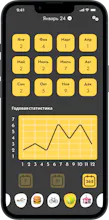
Emoji Diary lets you quickly record your emotions and daily habits using fun emojis — no typing needed. Just pick emojis that show how you feel and what you did, creating a colorful visual diary.
No reviews yetBe the first to leave a review for Emoji Diary
Maker
📌
Emoji Diary - Track Your Habits and Moods with Emojis
Emoji Diary is an innovative app designed for those who want to quickly and easily record their emotions, events, and habits - without the hassle of writing long notes. Instead of words, use expressive emojis! Simply choose the emojis that best reflect your mood, actions, and achievements to create a unique, colorful visual diary.
Why Emoji Diary?
Traditional journaling takes time and motivation. Emoji Diary turns this process into a fun, engaging game that inspires you to check in with yourself every day. Express yourself with hundreds of different emojis that you can combine to make bright and memorable entries.
Key features:
Quick one-tap recording of emotions and daily events
Convenient calendar view with mood-based color coding for each day
Detailed stats and analytics to track your habits and emotional patterns
Achievement system that motivates you to stay consistent and build healthy habits
Vibrant, playful interface with smooth animations and transitions - a diary you’ll love to open daily
Widget for fast emoji logging directly from your phone’s home screen
Emoji Diary helps you better understand yourself, monitor your mood and habit progress, and makes journaling an easy and enjoyable part of your routine. It’s not just an app - it’s your personal emotional assistant and daily motivator.
Report
Maker
🌍 Today was all about localization!
I spent the day polishing Emoji Diary for a global audience — translating and adapting the app into 10 languages, with both light and dark mode App Store screenshots.
From French to Polish, from German to Portuguese — I didn’t just translate the words, I crafted each line to feel native, natural, and emotionally on-brand.
I’d love your thoughts or tips from folks with localization experience!
🛠️ Built solo. Designed in Figma. Translated with ❤️
Report
Maker
🎯 Emoji Diary and Universal Links:
In Emoji Diary, I keep refining the UX so users never leave the app — even for actions like email verification or password reset.
Instead of Firebase Dynamic Links, I chose a custom solution using universal links and my own email templates. This gave me more control and simplified the flow.
✅ Emoji Diary now supports:
📩 Opening email verification directly inside the app
🔐 Allowing password reset without opening a browser
🔗 Working manually with universal links and app links
🧩 Mini-guide: how to implement custom universal links
Create your own email templates instead of using dynamic links
Handle links in React Native via Linking and Linking.getInitialURL()
Parse the action parameter and navigate to the appropriate screen
Set up assetlinks.json at the site root for Android
Make sure your domain uses HTTPS and doesn’t redirect
Now users just click the link in the email — and get straight to the right screen in the app.
No Safari, no browser, no extra UX clutter.
If you’re curious about the link handling architecture, custom email templates, or screen behavior — just ask, I’m happy to share.
🌍 Today was all about localization!
I spent the day polishing Emoji Diary for a global audience — translating and adapting the app into 10 languages, with both light and dark mode App Store screenshots.
From French to Polish, from German to Portuguese — I didn’t just translate the words, I crafted each line to feel native, natural, and emotionally on-brand.
💪 20 screens done in ~6 hours — UI tweaks, typography, length handling, emotional tone.
Here’s a sneak peek at the final visuals.
I’d love your thoughts or tips from folks with localization experience!
🛠️ Built solo. Designed in Figma. Translated with ❤️
🎯 Emoji Diary and Universal Links:
In Emoji Diary, I keep refining the UX so users never leave the app — even for actions like email verification or password reset.
Instead of Firebase Dynamic Links, I chose a custom solution using universal links and my own email templates. This gave me more control and simplified the flow.
✅ Emoji Diary now supports:
📩 Opening email verification directly inside the app
🔐 Allowing password reset without opening a browser
🔗 Working manually with universal links and app links
🧩 Mini-guide: how to implement custom universal links
Create your own email templates instead of using dynamic links
Handle links in React Native via Linking and Linking.getInitialURL()
Parse the action parameter and navigate to the appropriate screen
Set up assetlinks.json at the site root for Android
Make sure your domain uses HTTPS and doesn’t redirect
Now users just click the link in the email — and get straight to the right screen in the app.
No Safari, no browser, no extra UX clutter.
If you’re curious about the link handling architecture, custom email templates, or screen behavior — just ask, I’m happy to share.
#EmojiDiary #UniversalLinks #DeepLinks #ReactNative #Firebase #MobileUX #AppDevelopment #NoMoreRedirects