EasyCode Scanner

EasyCode Scanner

QR/Barcode: Scan, capture, count | Export Excel with images.

6 followers

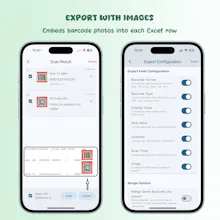
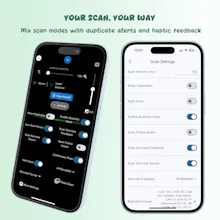
A scanner that does more than just scan. 🚀 🔍 Scan Flexibly Use multi-mode (single, continuous, gun) for any QR or barcode. 📸 Capture Proof Automatically save a photo of each barcode for your records. 🔢 Add Quantities Instantly set a quantity for every item you scan. 📄 Export with Images Generate clean Excel files with all your data and images embedded! Perfect for inventory, assets, and records. ✨
This is the 2nd launch from EasyCode Scanner. View more

EasyCode Scanner: Capture & Count

QR/Barcode: Scan, capture, count | Export Excel with images.
Go beyond basic scanning! 🚀 Capture photo proof 📸 with every barcode, add quantities instantly 🔢, and export it all to Excel—with images embedded! Perfect for reliable inventory, asset, and record-keeping.
EasyCode Scanner: Capture & Count gallery image
Free Options
Launch Team / Built With
ace.me
ace.me
Your new website, email address & cloud storage
Promoted

What do you think? …

IndieDevCarp
Maker
📌
Hello everyone, and thanks for checking out EasyCode Scanner! I'm CarpOrange, the creator of the app. I'm incredibly excited to be back on Product Hunt to share the biggest update to EasyCode Scanner yet! The first version was all about creating a fast and reliable scanning experience. But I kept hearing from users—especially those managing inventory, assets, or complex records—that they needed more than just a scan. They needed *proof*, and they needed to handle *quantities* efficiently. That's why I developed the two new cornerstone features for this version: 1. **📸 Automatic Image Capture:** For every single scan, the app automatically saves a photo of the item's barcode. This provides a visual record, preventing disputes and making your data 100% verifiable. 2. **🔢 Instant Quantity Input:** No more scanning the same item multiple times or manually editing numbers later. Now, you can set a quantity immediately after each scan, streamlining your workflow. And of course, we've taken our popular Excel export feature to the next level—you can now **export your data sheets with the captured images embedded directly in the file!** This update was a labor of love, driven entirely by user feedback. My goal was to build a tool that feels less like a simple scanner and more like a powerful data-capture partner. I'll be here all day to answer your questions and listen to your feedback. What would you like to see next? Thank you for your support! 🙏