
Dreammmer
Create production-ready AI images with precise control
7 followers
Create production-ready AI images with precise control
7 followers
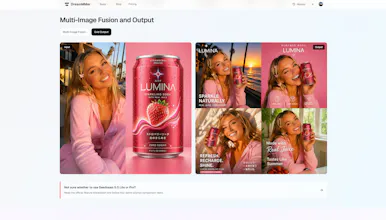
Dreammmer brings Seedream 5.0 Pro into a focused browser workspace for creating production-ready visuals. Generate from text or reference images, render information-dense graphics, and refine results with precise coordinates, freeform marking, layer separation, and multi-image fusion. New users receive 50 credits—enough to create five images and explore the full workflow.



Free Options
Launch Team

Render: Get up to $100K in startup creditsCloud infrastructure for founders who want to move fast and NOT break things
Promoted
@liangliang_xiong Tried this out today to generate a product banner for a QA SaaS tool I'm building, and wanted to share some quick impressions.
Account creation was smooth, signed up with Google, no friction there. Generation time felt reasonable too, definitely within what I'd expect for a pro tier image model. The banner rendered impressively well for AI-generated text, headline, feature chips, and the CTA button text are all clean and legible, which is genuinely hard for most text-to-image models.
@andrei_constantin_alexandru Thank you for trying Dreammmer on the QA SaaS you’re building and for taking the time to share this. Reading that the headline, feature chips, and CTA all stayed clear genuinely made my day. Text rendering is one of the hardest parts of image generation, and it’s something I’ve spent a lot of time trying to get right. I’m also glad the Google sign-up and generation time felt smooth.
I’ve added 100 credits to your Dreammmer account as a thank-you. They’re already in your account and ready to use.
If you run into any issues, or if something doesn’t work the way you expect, please let me know. I’d really appreciate the feedback as I continue improving Dreammmer.
Good luck with your QA SaaS! I’d love to see how the banner looks in context when you’re ready to share it.
A keyboard shortcut for toggling between edit and preview mode would be a nice quality of life addition, especially when iterating on dense infographics where you want to quickly check how the final render compares to the marked-up version.
@salihawkmf Thank you, Saliha. I really appreciate you taking the time to try Dreammmer and share your feedback.
I hope you’ll continue exploring Dreammmer. I’ll add an extra 100 credits to your account so you can keep trying it out. If anything feels unclear or slows down your workflow, please let me know anytime. Your honest feedback will help me continue improving the product.
Thanks again for giving Dreammmer a try!