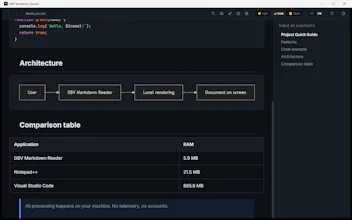
Blazing-fast, native Markdown reader for Windows, Linux & Mac. Built with Rust and Tauri v2, it opens files in under 200ms with a tiny RAM footprint (<64MB). An offline-first, open-source alternative to heavy Electron apps. Key features: ⢠š Interactive Mermaid diagrams (SVG) on the fly. ⢠š Live auto-reload keeping your scroll position. ⢠𧮠Fast KaTeX math equations. ⢠š 100% private: no tracking, ads or telemetry. ⢠šØ Dark, Light and Sepia themes. Clean, fast and free.
Wispr Flow: Dictation That Works EverywhereStop typing. Start speaking. 4x faster.
Promoted
Maker
š
Hi Product Hunt community!
I'm David, the creator of DBV Markdown Reader. I built this tool out of pure frustration: I was tired of opening massive, memory-hungry Electron editors or spinning up a full browser tab just to preview a simple local Markdown file or read a README. I wanted something that felt instant, clean, and completely private.
The main problem I wanted to solve was speed, along with having out-of-the-box support for Mermaid diagrams and math equations without messing around with extra plugins. By leveraging Rust and Tauri v2, the app achieves an instant start of under 200 ms and uses a fraction of the RAM of standard editors (only ~5.9 MB with files open!).
š The Evolution & Traction:
It started as a simple Windows-only project. But when I shared it on LinkedIn, it completely blew up with over 120,000 views and 200+ comments (you can check out the original post here: https://www.linkedin.com/posts/d... ).
Thanks to that amazing community feedback, the project has already gathered 39 stars on GitHub in just one week! It also inspired me to adapt it into a true multiplatform app for Linux and macOS.
To make downloading seamless and bypass annoying SmartScreen warnings on Windows, I published it on the Microsoft Store. The Linux packages (.deb / .AppImage) are fully live, and the Apple UptoDown release is currently pending approval!
It's 100% open-source, free, and ad-free. I am incredibly eager to read your thoughts, feature ideas, and suggestions in the comments. Thank you so much for checking it out!
David Bueno Vallejo
https://davidbuenov.com/