
Ctrl Deck V1.8
Visual Windows workspace, launcher & shortcut manager
9 followers
Visual Windows workspace, launcher & shortcut manager
9 followers
Ctrl Deck is a visual productivity hub for Windows 10/11. Launch apps, files, folders and websites; organize Favorites and Workspaces; and use Live Spaces to manage windows already open. Add keyboard shortcuts with conflict detection, drag and drop resources, and work visually or keyboard-first. Available in 10 languages, with a full 14-day trial and a one-time purchase—no subscription.


Free Options
Launch Team

Dropbox SignSimple, secure eSignatures for the way your team works.
Promoted
Hi Product Hunt,
I built Ctrl Deck because I needed it myself.
My Windows taskbar had become messy, overloaded and honestly painful to use. I was constantly losing time trying to find the right icon, bring back the right app, or reopen tools I use all day across one or multiple screens.
I wanted something simple: a fast visual panel where I could keep my most-used apps, shortcuts and actions visible, organized and ready to trigger.
What started as a personal utility slowly became a more complete Windows launcher. During testing, I kept adding the things that were actually useful in daily work: support for .exe apps, .lnk shortcuts, files, folders, URLs, commands and specific Windows actions.
The goal was not to build another complex automation platform. Ctrl Deck is more focused: reduce taskbar friction, make repeated actions visible, and help Windows users move faster without a heavy setup.
This first public version is the result of that process: testing, noticing what was missing, improving the workflow, simplifying the interface, and trying to keep the whole thing fast, clean and pleasant to use.
I’d really appreciate blunt feedback, especially on:
- whether the value is clear in a few seconds
- whether the positioning feels right
- what would make you trust and adopt a new Windows utility
- what feature feels missing for your own workflow
Thanks for checking it out.
Bruno
Coming soon: Ctrl Deck V1.7, a major evolution of the current V1.6 release.
Ctrl Deck is built for people who constantly move between applications, folders, files, URLs and everyday resources. The goal is not simply to launch an app, but to make the tools you use visible, organized and faster to reach.
At first launch, V1.7 can analyze compatible application shortcuts already available on the desktop and taskbar. It suggests editable groups, while you keep full control: select an entire group, select only specific applications, ignore anything you do not need, then rename or reorganize groups later. Nothing is moved or changed in Windows.
The new Apps Library helps you find compatible applications detected on your PC and place them where they are useful: as a single shortcut, in a group or in a Workspace. Search, drag and drop, application detection and repair tools help keep your setup usable when software is added or a shortcut target changes.
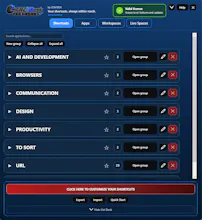
Groups replace an increasingly dense shortcut layout with a clearer, stable panel: expand one group, collapse everything, open all groups, or search directly for an item.
Workspaces can be built manually for a daily routine, project, client or task, or saved from a useful compatible work setup you already have open. Live Spaces add a practical continuity layer by helping reopen compatible items after an interruption.
Keyboard shortcuts remain optional. They can be assigned to an item or a group, use safer combinations by default, and include redesigned conflict handling so an application’s own command can keep priority when needed.
Ctrl Deck V1.7 is designed to help you search less, switch faster and work from an environment that matches the way you actually work.