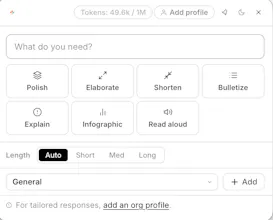
Cruxi is a universal AI toolbar for macOS and Windows. Select text anywhere, press a shortcut, and polish, explain, summarize, or draft with your own documents — without switching apps or copy-pasting into browser tabs. This matches the landing page promise: General mode, Draft mode, Knowledge base mode, and system-wide use across Gmail, Word, Excel, Chrome, Notion, Slack, PDFs, and other desktop apps.
Hey Product Hunt 👋
We built Cruxi because I was tired of the same workflow every day: copy text from Gmail, Word, PDFs, or a browser → paste it into an AI tab → explain the context again → copy the answer back.
That works once or twice. But when your work happens across documents, emails, spreadsheets, PDFs, and internal files, it becomes painful fast.
Cruxi is a universal AI toolbar for your desktop. Select text in any app, press a shortcut, and the toolbar appears right where you are.
Today it supports three ways to work:
✦ General — polish, shorten, explain, summarize, translate, or draft quick replies anywhere
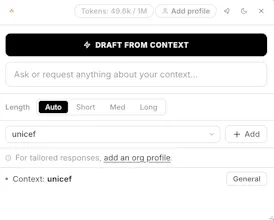
✦ Draft — connect a project folder and draft sections using your actual files, templates, examples, and data
✦ Knowledge base — upload documents once, create named context banks, and ask questions from anywhere
The goal is simple: AI should not be trapped in a browser tab. It should work where you work.
We also added a browser simulation so you can try the toolbar without installing anything.
I’d love feedback on one thing: does this feel more useful as a general AI toolbar, or should we position it more strongly around document-grounded drafting and knowledge base work?
Thank you for checking it out 🙏
Report
No reviews yetBe the first to leave a review for Cruxi Universal Toolbar