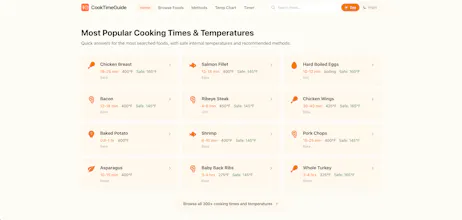
Instant cooking times and safe internal temperatures for 300+ foods. Air fryer, oven, grill, Instant Pot, slow cooker, and more. USDA verified data with a free built-in kitchen timer.
Been heads-down building something new: MarketFairValue, a free tool that tells you if a stock is undervalued or overvalued using 4 valuation models.
It covers 140+ US stocks with fair value analysis, dividend planning, earnings tracking, historical returns, and stock comparisons. No signup, no paywall, updated daily.
No reviews yetBe the first to leave a review for CookTimeGuide
LightfieldAI-native CRM that builds itself and does work for you
Promoted
Maker
📌
Hey PH! I made this because every time I Googled "how long to bake salmon," I'd get someone's childhood memory about fishing with their dad before the actual answer.
CookTimeGuide is dead simple: search a food, get the time and temp. That's it. All the data comes from USDA guidelines, so it's not just some random blog guessing.
No account, no app, no paywall. It's a free website.
A few things I think are cool:
Pages load in under a second (it's a static site on Cloudflare, no server waiting around)
There's a built-in timer that keeps your screen on while you cook, so you don't have to keep tapping your phone with greasy hands
It also covers stuff like how long to brine a turkey, marinate chicken, or thaw a steak, things that are weirdly hard to find good answers for
Would love to hear what foods or features you'd want added. Let me know!
Report
How often do you update the data to reflect USDA changes, and does the timer work in the background if I switch apps to check a recipe mid-cook?
Report
Maker
@sat908949344395Data updates: We review and update our cooking times and temperatures against the latest USDA Food Safety guidelines on a quarterly basis. If USDA publishes a significant safety update (like revised safe internal temperatures), we push those changes immediately rather than waiting for the next cycle.
Background timer: CookTimeGuide is a web app, so timer behavior depends on your browser and device. On most modern phones, if you start a timer and switch to another app, the browser tab stays active and you'll still get a notification when time is up. That said, we'd recommend keeping the tab open rather than fully closing the browser. We're exploring adding PWA support so it works even more reliably in the background, similar to a native app experience.
Hope that helps, and thanks for checking us out!
Report
Does it work offline once you pull up a cooking time, or do you need a constant connection to the USDA data?
Report
Maker
@saygun4247 Yep! All cooking times are baked directly into each page, no live connection to USDA or any external API. Once the page loads, it works even if you lose Wi-Fi mid-cook. We're also exploring PWA support for full offline access to pages you haven't loaded yet.
Report
How does the timer sync up if I'm juggling a couple of dishes at different temps and methods at the same time?
Report
Maker
@idembykkal6r3h We don't have a multi-timer feature yet, but it's on our radar! Right now you can open separate tabs for each dish and reference the times side by side. We're exploring adding a "cooking session" mode where you could run multiple timers on one screen with clear labels for each dish and method. Appreciate the feedback, it helps us prioritize what to build next.
Report
Love how the app doesn’t overload you with info; the USDA temps sit right next to each method’s cook time so you can trust everything at a glance. The fact that the timer is already built in saves me from juggling three apps when dinner’s going.
Report
Maker
@toprakcwek Thanks so much! That's exactly what we aimed for: everything you need on one screen, no app-juggling. Really glad the timer and USDA temps are saving you hassle!
Report
Punched in chicken thighs and got times for the air fryer and oven in a second, then the timer just started counting. Honestly the USDA temps are the part I trust most — no more guessing at 165 vs 160 with ground turkey.
How often do you update the data to reflect USDA changes, and does the timer work in the background if I switch apps to check a recipe mid-cook?
@sat908949344395 Data updates: We review and update our cooking times and temperatures against the latest USDA Food Safety guidelines on a quarterly basis. If USDA publishes a significant safety update (like revised safe internal temperatures), we push those changes immediately rather than waiting for the next cycle.
Background timer: CookTimeGuide is a web app, so timer behavior depends on your browser and device. On most modern phones, if you start a timer and switch to another app, the browser tab stays active and you'll still get a notification when time is up. That said, we'd recommend keeping the tab open rather than fully closing the browser. We're exploring adding PWA support so it works even more reliably in the background, similar to a native app experience.
Hope that helps, and thanks for checking us out!
Does it work offline once you pull up a cooking time, or do you need a constant connection to the USDA data?
@saygun4247 Yep! All cooking times are baked directly into each page, no live connection to USDA or any external API. Once the page loads, it works even if you lose Wi-Fi mid-cook. We're also exploring PWA support for full offline access to pages you haven't loaded yet.
How does the timer sync up if I'm juggling a couple of dishes at different temps and methods at the same time?
@idembykkal6r3h We don't have a multi-timer feature yet, but it's on our radar! Right now you can open separate tabs for each dish and reference the times side by side. We're exploring adding a "cooking session" mode where you could run multiple timers on one screen with clear labels for each dish and method. Appreciate the feedback, it helps us prioritize what to build next.
Love how the app doesn’t overload you with info; the USDA temps sit right next to each method’s cook time so you can trust everything at a glance. The fact that the timer is already built in saves me from juggling three apps when dinner’s going.
@toprakcwek Thanks so much! That's exactly what we aimed for: everything you need on one screen, no app-juggling. Really glad the timer and USDA temps are saving you hassle!
Punched in chicken thighs and got times for the air fryer and oven in a second, then the timer just started counting. Honestly the USDA temps are the part I trust most — no more guessing at 165 vs 160 with ground turkey.
@elabinboaqxmg Thanks so much!!