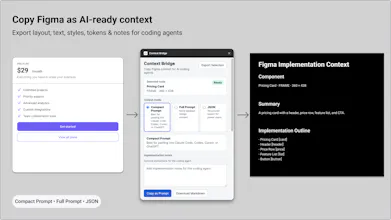
Copy Figma frames as AI-ready implementation context. Export layout, text, styles, tokens, semantic roles, component structure, and notes as a Compact Prompt, Full Prompt, or JSON for Claude Code, Cursor, Codex, ChatGPT, and other coding agents.
Hey everyone 👋
I built Context Bridge because I kept running into the same workflow problem.
When using Claude Code, Cursor, Codex, or other coding agents, I found myself repeatedly translating Figma frames into setup prompts before asking the agent to build anything.
The design already contained the information, but the context didn’t travel well.
Layout structure, hierarchy, semantic roles, token references, component relationships, and the little implementation details that usually live in your head all had to be re-explained manually.
Context Bridge is my attempt to close that gap.
It exports a selected Figma frame, component, instance, or component set as structured implementation context that can be pasted directly into AI coding workflows.
Current output formats:
• Compact Prompt
• Full Prompt
• JSON
It doesn't generate code and it doesn't call any external AI APIs. It simply packages the information already in your Figma file into a format that travels better.
This is a free beta and I'm especially interested in feedback from designers, design engineers, and frontend developers working with AI-assisted implementation.
What context do you still find yourself adding manually when working with coding agents?
Report
No reviews yetBe the first to leave a review for Context Bridge