No reviews yetBe the first to leave a review for Compress & Convert Images
Maker
📌
I built Squash because I kept running into the same frustration — every image compression tool I used was uploading my files to some server I knew nothing about. That felt wrong, especially when working with client assets or anything remotely sensitive.
So I built Squash to do everything locally. Your images never leave your browser — compression, format conversion, resizing — all powered by WebAssembly running entirely on your machine.
What it does:
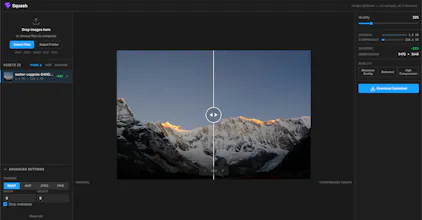
Compress to JPEG, WebP, and AVIF with a live quality slider
Resize images with max-width/max-height constraints
Before/after compare view so you can see exactly what you're trading off
Batch process multiple images at once
No account, no watermarks, no uploads — ever
The hardest part was getting AVIF conversion to work reliably across browsers without a server fallback. Ended up leaning on OffscreenCanvas in a Web Worker so the UI never blocks, even on large batches.
Would love your feedback — especially on formats you'd want supported or workflow features that would make this actually useful day-to-day.
Report
💡 Bright idea
how does it handle batch processing if everything runs locally in the browser, does it get slow with like 50+ large photos at once?
Report
Maker
@gzdegalerinpu0 Thanks for trying it out! It's intentionally built to set quality per image rather than one setting for all — since the optimal compression level varies image to image. That said, it won't slow down or freeze your browser since each image processes in a background thread. Give it a try and let me know how it feels!
Report
How does it handle really large batch uploads, like 50+ high-res images at once? Curious if it stays snappy in the browser or if things start to crawl.
Since everything runs locally on your machine using a background thread, it should handle large batches without freezing the UI nothing gets uploaded at all. Give it a shot with your 50+ images and let me know if you hit any issues. Happy to improve based on your feedback!
Report
One thing that would push this over the top for me is bulk folder handling. Dragging in a whole directory of mixed JPEGs and PNGs and getting back a zip of optimized AVIFs (or whatever format I pick) would save a ton of clicks.
Report
Maker
@parkpiper66988 Great news — that already exists! You can drag in an entire folder and Squash will pick up all the images. Once processed, you can export them all as a zip in whatever format you choose. Give it another try and let me know if anything feels off!
Report
Ran a few photos through it and the WebP output was noticeably smaller than what I usually get, all without anything leaving my browser which is a nice touch.
The fact that everything runs locally in the browser without a single upload feels like the right call for something handling user images. Clean, focused, and respects privacy by default.
how does it handle batch processing if everything runs locally in the browser, does it get slow with like 50+ large photos at once?
@gzdegalerinpu0 Thanks for trying it out!
It's intentionally built to set quality per image rather than one setting for all — since the optimal compression level varies image to image. That said, it won't slow down or freeze your browser since each image processes in a background thread. Give it a try and let me know how it feels!
How does it handle really large batch uploads, like 50+ high-res images at once? Curious if it stays snappy in the browser or if things start to crawl.
@dilarasidda Thanks for trying it out!
Since everything runs locally on your machine using a background thread, it should handle large batches without freezing the UI nothing gets uploaded at all. Give it a shot with your 50+ images and let me know if you hit any issues. Happy to improve based on your feedback!
One thing that would push this over the top for me is bulk folder handling. Dragging in a whole directory of mixed JPEGs and PNGs and getting back a zip of optimized AVIFs (or whatever format I pick) would save a ton of clicks.
@parkpiper66988 Great news — that already exists! You can drag in an entire folder and Squash will pick up all the images. Once processed, you can export them all as a zip in whatever format you choose. Give it another try and let me know if anything feels off!
Ran a few photos through it and the WebP output was noticeably smaller than what I usually get, all without anything leaving my browser which is a nice touch.
@eyll09641878946 Glad you liked it.
The fact that everything runs locally in the browser without a single upload feels like the right call for something handling user images. Clean, focused, and respects privacy by default.
@osmanyavuzu0v3 Thanks!