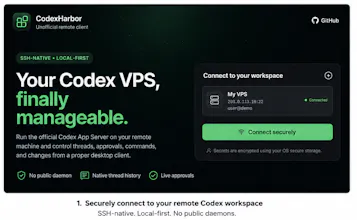
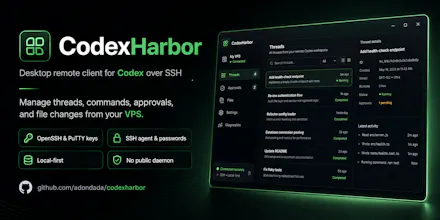
CodexHarbor is an MIT-licensed Windows and Linux desktop client for running Codex against projects on a remote Linux VPS. Connect directly over SSH using OpenSSH or PPK private keys, encrypted keys with passphrases, password authentication, or your local SSH agent. Resume real Codex threads, stream commands and diffs, approve actions, switch models and sandbox policies, and inspect diagnostics. No public App Server port, hosted relay, or browser terminal.
No reviews yetBe the first to leave a review for CodexHarbor
Maker
📌
Hey Product Hunt - I built CodexHarbor after running Codex CLI on a headless VPS. I could continue work from my phone, but I wanted a native PC client with explicit SSH profiles, direct connections, portable builds, and visibility into what the App Server was doing.
What it does:
Connects a Windows or Linux PC directly to a Linux VPS over SSH
Supports OpenSSH/PPK private keys, passphrase-protected keys, passwords, and a local SSH agent
Shows real threads, streamed messages, commands, output, diffs, MCP calls, and approvals
Exposes model, reasoning, sandbox, and approval controls
Uses host-key verification/pinning and OS-backed secret storage
Opens no public App Server port and uses no hosted relay
Important: OpenAI's official Codex app now supports Remote SSH too. CodexHarbor is the open-source, direct-control alternative, not a claim that the official app cannot connect remotely.
It is an early beta. I would especially value feedback on SSH compatibility, onboarding, and which remote-workflow feature should come next.
Report
managing remote setups for ai-assisted work is usually a mess of open ports and security risks. i love the idea of keeping everything behind ssh to stay secure while shipping. it definitely beats trying to sync local files to a server manually every five minutes. how do you handle the terminal output when things get noisy during a long build?
Report
love that you kept this MIT and skipped the hosted relay entirely, the direct SSH model with key or agent support is exactly what i want for keeping my codebase private. diff streaming and model switching right in the client without a browser tab is a really thoughtful touch.
Report
finally a way to run codex against my vps without exposing a port or dealing with browser terminals. the ssh key flow with passphrase support just worked, and diff streaming felt snappy on my small project.
managing remote setups for ai-assisted work is usually a mess of open ports and security risks. i love the idea of keeping everything behind ssh to stay secure while shipping. it definitely beats trying to sync local files to a server manually every five minutes. how do you handle the terminal output when things get noisy during a long build?
love that you kept this MIT and skipped the hosted relay entirely, the direct SSH model with key or agent support is exactly what i want for keeping my codebase private. diff streaming and model switching right in the client without a browser tab is a really thoughtful touch.
finally a way to run codex against my vps without exposing a port or dealing with browser terminals. the ssh key flow with passphrase support just worked, and diff streaming felt snappy on my small project.