Code Formatter for Chrome: Make the raw CSS, JSON, and JavaScript code look clean and organized. One-click download, collapsible sections, and easy auto-detection on any webpage. Simple, efficient, and user-friendly.
I always wanted to see the beautified code directly in the browser without any extra external tools. Finally, I made this extension to make my work easier. Happy to share this with you all, hope it'll help you find it useful. Here are a few key points:
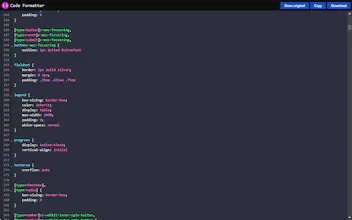
➡️Syntax Highlighting: Sophisticated syntax highlighting for CSS, JSON, and JavaScript. Easily identify and understand the structure of the code.
➡️Readable Code Formats: Automatically beautifies CSS, JSON, and JavaScript, presenting them in clear and reader-friendly formats.
➡️Effortless Code Management: Enjoy ultimate convenience with one-click options to download or copy the formatted code.
➡️Collapsible Code Sections: Streamline code navigation with collapsible sections. Focus on relevant portions of the code, reducing clutter and enhancing overall readability.
➡️Line Numbers: Keep track of the code effortlessly with integrated line numbers.
➡️Auto-detect Code on Page: No need to manually specify file extensions or toggle settings. Code Formatter intuitively detects CSS, JSON, and JavaScript content on any webpage, regardless of the URL's extension.
➡️Low Footprint: We believe in lightweight solutions. Code Formatter is compiled to a minimal size, ensuring that your browser's performance remains unaffected while still enjoying enhanced code readability.




Box Shadow Generator