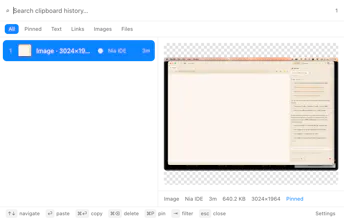
ClipStack keeps every copy — text, links, images, screenshots and files — in a searchable stack. Press ⌘⇧V, type a few letters, hit Enter, and it pastes straight back into the app you were in. Local SQLite, no account, no telemetry. Free and open source.
Customer.ioAutomate Messaging Everywhere — Startups Get 12 Months Free
Promoted
Maker
📌
Hey Product Hunt 👋
The clipboard has held exactly one thing since 1983. You copy a link, then copy a snippet to check something, and the link is gone. I've lost that link maybe ten thousand times.
ClipStack is my fix. It sits in the menu bar with no Dock icon. Press ⌘⇧V and a panel opens at your cursor with everything you've copied. Type a few letters to narrow it, hit Enter, and it pastes back into whatever app you were just in — it remembers the frontmost app, hides itself, and sends a real ⌘V. Enter is the whole interaction.
A few things I cared about:
It skips your passwords. Password managers flag their clipboard entries as concealed or transient; ClipStack ignores anything carrying those flags on sight. You can also pause capture from the menu bar.
Nothing leaves your Mac. History is a local SQLite file. No account, no sync, no telemetry, no network calls of any kind.
Images are first-class. Retina screenshots stored at full resolution with a thumbnail for the list. Copy files in Finder and they land in the stack as real files — paste one into Mail and you get the file, not its path. (That one took a JXA detour; Electron's clipboard can't write a file.)
It's tiny and it idles. Adaptive polling — 400 ms while you're active, 1.5 s when you're not.
Free, MIT, source is on GitHub. It's an early build (0.1.3) and not Apple-notarized yet, so the first launch needs a right-click → Open — the site's FAQ walks through it.
I'd genuinely love to know what your clipboard manager does that this doesn't. Every reply today goes on the roadmap. 🙏