
ClipMark
Never lose anything you copy again
97 followers
Never lose anything you copy again
97 followers
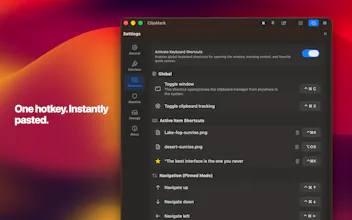
ClipMark is a clipboard manager for macOS that keeps everything you copy. Quick Recall lets you instantly browse your clipboard with a shortcut — hold, scroll, release → paste. Save links, code snippets, notes, images and more. Search instantly, tag items, and reuse anything in seconds. No more losing copied content.




Hi Product Hunt 👋
ClipMark started from a simple idea:
everything I copy should still be there when I need it.
Sometimes I want to search and organize things — with tags, filters and context.
But most of the time, I just want them back instantly.
That’s where Quick Recall comes in:
hold a shortcut, scroll through your clipboard with previews (great for screenshots), release → paste.
ClipMark combines both:
fast recall when you need speed, and powerful search when you need control.
Happy to answer any questions 🙂
— Mario
Hey everyone 👋
Quick update.
The biggest one: ClipMark now has a proper detail view. You can pop the whole history out of the menu bar into its own resizable window — your clips on the left, and on the right a panel that shows a live preview of whatever you select. From there you can dig into the details or edit text inline, without anything popping over the top of it. It turns ClipMark from a quick "grab and go" popover into something you can actually sit and work in, and the whole thing is keyboard-driven if you prefer.
Alongside that I spent a good chunk of time on performance. Scrolling is noticeably smoother now, even if your history runs into thousands of items, and the app opens faster than it used to. I also hardened how it accesses your bookmarked files behind the scenes, plus the usual round of little fixes and polish.
If anyone wants to try it, I've got a few App Store codes to give away — they unlock the full app (normally $17) for free. Just drop me a note and I'll send one over. I'd genuinely love some honest feedback on how the new window feels, especially if you keep a big history around. 🙏
first time launching here… didn’t expect this at all.
really appreciate the support so far 🙏
@mac303 Love the idea. Does this work with voice directly? or just the native voice functions?
@michael_zhang20 Thanks! ClipMark works with macOS VoiceOver out of the box. If you run into any issues with it, let me know — happy to improve the
experience!
@mac303 👍
Quick update:
I’m rolling out an update with a refined detached window UI and smoother workflow.
Thanks again for all the support 🙌
Been taking a bit of time to process everything.
A few things already stand out that I can improve and make clearer.
Overall — a really great experience.
I’ll keep building.