
ClipMark
Never lose anything you copy again
94 followers
Never lose anything you copy again
94 followers
ClipMark is a clipboard manager for macOS that keeps everything you copy. Quick Recall lets you instantly browse your clipboard with a shortcut — hold, scroll, release → paste. Save links, code snippets, notes, images and more. Search instantly, tag items, and reuse anything in seconds. No more losing copied content.



Payment Required
Launch Team

CloudflareYour next app belongs on Cloudflare Workers. Deploy for free
Promoted
Hi Product Hunt 👋
ClipMark started from a simple idea:
everything I copy should still be there when I need it.
Sometimes I want to search and organize things — with tags, filters and context.
But most of the time, I just want them back instantly.
That’s where Quick Recall comes in:
hold a shortcut, scroll through your clipboard with previews (great for screenshots), release → paste.
ClipMark combines both:
fast recall when you need speed, and powerful search when you need control.
Happy to answer any questions 🙂
— Mario
Hey everyone 👋
Quick update.
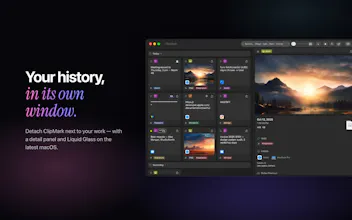
The biggest one: ClipMark now has a proper detail view. You can pop the whole history out of the menu bar into its own resizable window — your clips on the left, and on the right a panel that shows a live preview of whatever you select. From there you can dig into the details or edit text inline, without anything popping over the top of it. It turns ClipMark from a quick "grab and go" popover into something you can actually sit and work in, and the whole thing is keyboard-driven if you prefer.
Alongside that I spent a good chunk of time on performance. Scrolling is noticeably smoother now, even if your history runs into thousands of items, and the app opens faster than it used to. I also hardened how it accesses your bookmarked files behind the scenes, plus the usual round of little fixes and polish.
If anyone wants to try it, I've got a few App Store codes to give away — they unlock the full app (normally $17) for free. Just drop me a note and I'll send one over. I'd genuinely love some honest feedback on how the new window feels, especially if you keep a big history around. 🙏
Hi Product Hunt 👋
ClipMark 2.1 is our biggest update so far:
Quick Recall, redesigned: hold Control-Command-R and flip through your clipboard history in a full-screen cover flow. Let go, and it's on your clipboard.
Liquid Glass design and a new app icon on macOS 26 and later
iCloud sync across your Macs, optional and through your own iCloud
Passwords your way: masked automatically, revealed with a click, and any clip can be marked as a password
Still native (SwiftUI, no Electron), still private (no account, no servers of ours), still a one-time purchase.
I'd love your feedback: what's the one thing your clipboard manager should do better?
first time launching here… didn’t expect this at all.
really appreciate the support so far 🙏
@mac303 Love the idea. Does this work with voice directly? or just the native voice functions?
@michael_zhang20 Thanks! ClipMark works with macOS VoiceOver out of the box. If you run into any issues with it, let me know — happy to improve the
experience!
@mac303 👍
Quick update:
I’m rolling out an update with a refined detached window UI and smoother workflow.
Thanks again for all the support 🙌
Been taking a bit of time to process everything.
A few things already stand out that I can improve and make clearer.
Overall — a really great experience.
I’ll keep building.