Launching today

Chute
Drag a file, give it a shake, press one key
3 followers
Drag a file, give it a shake, press one key
3 followers
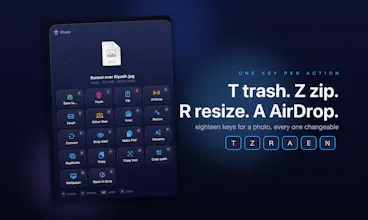
Chute is a drop tray for your Mac. Shake a file while you drag it and Chute appears beside the pointer. Drop it and press one key: T trash, Z zip, R resize, C convert, N rename, A AirDrop, E email, I install a DMG, O send it to your other Mac, 1 to 9 file it into your folders. Results stay in the tray so keys chain, a Control tap builds a queue, and ⌘Z takes back trashes, moves, zips and resizes. Native, notarized, no account.










Hi Product Hunt 👋
I move files all day: screenshots to resize, downloads to file away, DMGs to install, photos for my other Mac. Each of those is four steps. Chute makes it one key.
Chute is a tray for the file in your hand. You choose how it appears:
• Shake: give the file a little shake while you drag it (the default, so ordinary drags are left alone)
• Drag: turn shaking off and the tray appears on every drag
Drop the file on it and press a key, or press the key while you're still holding the file.
It's also just a tray. Drop things in and leave them there while you work, then drag them out to any folder or app, together or one at a time. Dragging out moves them; hold Control to copy.
Dragging is optional: select files in Finder and press a shortcut (I use ⌘→) to put them in the tray.
Every key (you can change any of them):
• Files: T trash, D duplicate, N rename or number a batch, S save to a folder, 1 to 9 your own folders
• Archives and apps: Z zip, U unzip, I install an app from its DMG (the DMG goes to the Trash)
• Images: R resize (1600, 50%, 1200×800 or 500 KB), C convert, X strip location and camera data, W set as wallpaper
• PDFs: M merge files into one PDF, L split a PDF, J turn pages into images
• Copy: F copy the contents, G copy the text out of a picture or PDF, H copy the path, B shorten a link
• Send: A AirDrop, E email, P print, O your other Mac on the same network, K open it in my other apps (Scry, Rawi, Jot)
• Plus any of your own Shortcuts, on a key you pick
Queue them: tap Control, pick the keys (say R, Z, then 2), tap Control again, and the file is resized, zipped and filed in one go. New files land next to the original, or in another folder when you end with S or a digit. One ⌘Z takes the whole queue back, and ⌘Z also undoes a single trash, move, rename, zip, resize or install.
Native Swift, notarized, no account, nothing uploaded. macOS 14 or later, Apple silicon.
Launch week: $9.99 instead of $14.99 until 4 October. Free 7-day trial, no card.
What would you want a key for? I read every comment.