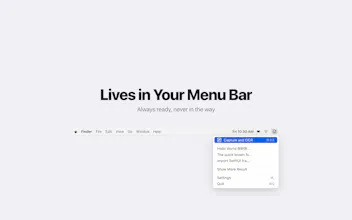
Cheese! OCR is a lightweight macOS menu bar app that extracts text from anything on your screen. Press a hotkey, select an area, and the text is recognized and copied to your clipboard — all in under a second. - 100% on-device OCR powered by Apple Vision — no data ever leaves your Mac - Supports English, Chinese, Japanese & Korean - Auto-copy to clipboard, zero extra steps - OCR history with search - No internet required, zero data collection
Hey Product Hunt! 👋
I built Cheese! OCR because I kept running into the same frustration during my daily workflow — and I bet many of you have too.
When I'm writing academic papers, I constantly need to reference text from PDF files that don't allow copy-paste (scanned documents, locked PDFs, image-based charts with labels). I used to retype everything by hand or rely on cloud-based OCR tools that required uploading my research materials to some server. Neither felt right.
Another scenario that happens all the time: grabbing error messages or log outputs from a video tutorial or a screenshot someone shared in Slack. You can't select text in an image — but with Cheese! OCR, you just press a hotkey, drag over the area, and the text is in your clipboard instantly.
So I built something simple: a menu bar app that does OCR entirely on-device using Apple's Vision framework. No uploads, no network requests, no accounts — the app doesn't even have network permissions. Your screenshots never leave your Mac.
It supports English, Chinese, Japanese, and Korean out of the box, which is essential for multilingual researchers and developers.
The name? Just like saying "Cheese!" when taking a photo — our little document mascot smiles every time you capture text :)
Would love to hear your feedback!
Report
Congrats on the launch. I was going to ask, does this work on locked PDFs, then I read more and realised it does- brilliant idea!
Love this ! fast, on-device OCR with zero friction is exactly what you want for everyday workflows. The hotkey → select → instant copy loop (especially with Apple Vision under the hood) feels super practical, and the no-data-leaves-your-Mac angle is a big plus.
We also launched on Product Hunt yesterday — building Ogoron, an AI system that generates and maintains test coverage as products evolve. Different space, but same idea of removing small but constant manual steps from daily work
@yanakazantseva1 Thanks so much, this means a lot! I’m really happy the workflow feels smooth — spent quite some time polishing that “zero friction” experience.
Also love what you're building with Ogoron — removing those tiny but persistent manual steps is such an underrated problem. Congrats on the launch, will check it out!
Cheese! OCR
Cheese! OCR
@leah_dyke Thanks so much! Yes, that’s exactly one of the use cases I built this for — glad you found it useful!
This is super ideal! Could this ever work as a mobile app using the camera?
Ogoron
Love this ! fast, on-device OCR with zero friction is exactly what you want for everyday workflows. The hotkey → select → instant copy loop (especially with Apple Vision under the hood) feels super practical, and the no-data-leaves-your-Mac angle is a big plus.
We also launched on Product Hunt yesterday — building Ogoron, an AI system that generates and maintains test coverage as products evolve. Different space, but same idea of removing small but constant manual steps from daily work
Cheese! OCR
@yanakazantseva1 Thanks so much, this means a lot!
I’m really happy the workflow feels smooth — spent quite some time polishing that “zero friction” experience.
Also love what you're building with Ogoron — removing those tiny but persistent manual steps is such an underrated problem. Congrats on the launch, will check it out!