Launched on December 20th, 2022
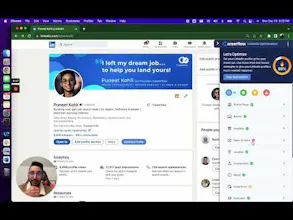
Careerflow.ai is the career copilot that finally brings sanity to the chaotic job search process by combining every essential tool into one seamless platform. Instead of juggling spreadsheets, multiple tabs, and scattered notes, you get a centralised command centre where you can optimise your LinkedIn profile step-by-step with expert-backed recommendations (which boosted my profile views by an estimated 40x), track every application visually through a Kanban board with a handy Chrome extension for saving jobs instantly, run your resume against ATS filters, generate tailored cover letters, analyse skill gaps based on real employer data, and even practice mock interviews—all without ever leaving the dashboard. What makes the experience genuinely great is that every feature is crafted by FAANG+ industry professionals who understand what recruiters actually look for, so the AI suggestions feel strategic rather than generic. The free tier offers generous access to test the waters, while the premium plan (around $14/month annually) saves hours of manual work each week and restores a sense of control and confidence during what is often a stressful, demoralising process. Whether you're a fresh graduate feeling overwhelmed or a seasoned professional targeting a specific role, Careerflow.ai delivers exactly what it promises: less chaos, more clarity, and better results.
Mobile App Development
The platform is currently desktop-only, which means you can't quickly check your job tracker or update an application status while on the go. A companion mobile app would make the experience truly seamless for busy job seekers.
Deeper Integration with Job Boards
While the Chrome extension is helpful, native one-click application tracking directly from LinkedIn, Indeed, and other major platforms would reduce manual entry even further.
More Customisation for Different Career Stages
The recommendations currently feel optimised for corporate professionals. Expanding templates and guidance for freelancers, creatives, academics, or non-traditional career paths would widen its appeal.
Interview Practice with Industry-Specific Questions
The mock interview tool is solid, but adding industry-specific question banks (e.g., for tech vs. marketing vs. healthcare) would make practice sessions even more realistic and valuable.
Progress Analytics Dashboard
Visual insights—like how many profile views you've gained over time, which sections you've improved, or how your application activity correlates with interview invites—would help users see their ROI and stay motivated.
Community or Peer Review Feature
Sometimes you want a human second opinion. Adding an opt-in community where users can swap resume feedback or share interview tips would complement the AI tools nicely.
These are all enhancements, not deal-breakers—Careerflow already delivers exceptional value. But addressing these would take it from great to absolutely indispensable.
I chose Careerflow's LinkedIn Optimisation Tool over alternatives because it offers the most comprehensive, user-friendly experience that actually respects your time and effort. Unlike other tools that force you to constantly export and upload PDFs of your profile—a clunky, tedious process—Careerflow works directly on your LinkedIn page through a seamless Chrome extension, allowing you to edit and optimise side-by-side without ever switching tabs. Its interactive, step-by-step guide covers every relevant section competitors often miss, from the "Featured" section to volunteer experience and "Open to Work" settings, providing personalised checklists and real examples for each area. While alternatives like Jobscan or Resume Worded lock their deepest insights behind expensive paywalls, Careerflow's core optimisation tool remains completely free, delivering actionable, expert-backed recommendations without asking for your credit card. The result is a tool that feels less like a generic automated checker and more like having a career coach looking over your shoulder—guiding you patiently through every improvement, explaining the "why" behind each suggestion, and ultimately helping you transform your profile without the usual frustration or hidden costs.
Yes, Careerflow's recommendations are fully customizable to your specific industry and role. The platform doesn't give you generic, one-size-fits-all advice. Instead, it analyses your profile against current best practices and standards within your target field. When you use the LinkedIn optimisation tool, the AI evaluates your headline, summary, experience, and skills specifically for your industry. A marketing professional receives completely different keyword recommendations than a software engineer, because the tool understands what recruiters in each sector actually look for. The personalised checklists and actionable insights are designed for your unique background, ensuring every suggestion feels relevant and targeted. Even the AI Resume Builder scans job descriptions to identify role-specific keywords, so you can customise applications for each position you pursue. Whether you work in technology, marketing, healthcare, finance, or any other field, Careerflow adapts its guidance accordingly, making the entire optimisation process genuinely useful rather than generic.
Yes, Careerflow provides robust support for crafting both headlines and About sections through a combination of AI generation and real-world examples. For headlines, the platform offers an AI-powered generator that creates compelling, keyword-rich headlines tailored to your target role and industry, drawing inspiration from successful professional profiles to show you what actually works. You can see real examples from verified users, helping you understand how to structure your own with the right balance of job title, key achievements, and industry keywords. For the About section, the AI About generator crafts personalised summaries that tell your professional story authentically, allowing you to customise the tone—whether polished and executive or warm and conversational—and choose between first or third-person perspective. The tool follows proven formatting best practices, typically organising your narrative into clear sections covering your background, key accomplishments, career aspirations, and a call to connect, while giving you the flexibility to regenerate multiple versions until you find the perfect fit. Throughout the process, you receive step-by-step guidance and editing history, so you never lose a draft you liked, making the entire experience feel less like staring at a blank page and more like having a skilled editor sitting beside you.
Yes, Careerflow's AI outputs are fully editable and designed to be saved and reused throughout your job search. The platform uses a smart two-tier system where you can create multiple Base Resumes for different types of roles you're targeting, and then tailor each one to create specific versions optimized for individual job applications. When you tailor a resume for a particular position, the system keeps it neatly organised under that specific job card to prevent version confusion. If you create a tailored resume that works really well and want to reuse it for similar roles, you can simply save it as a new Base Resume. Optimization updates overwrite the current resume rather than creating duplicate copies with messy filenames, keeping your library clean and focused. You can even set a default Base Resume so the system automatically uses your preferred version when creating new tailored resumes. Cover letters must be created from job-tailored resumes, ensuring every application receives personalised attention. This entire workflow gives you complete control to edit, organise, and repurpose your content without losing track of which version is which.
I started using this Careerflow Chrome extension when my job search felt scattered and slow. I installed it in Chrome and signed in. Suddenly I could save job postings from LinkedIn and other boards with one click. It added a floating icon on job pages, and I used that to autofill application forms and import job details into my dashboard. The extension became a daily part of my job hunt.
Features I liked most were the job tracker that organized roles across platforms and the AI tools that helped score my LinkedIn profile. I could generate cover letters in one click and even see how well my skills matched a job posting. The resume checker pointed out where I needed stronger keywords.
This helped my job search by keeping all applications in one place and saving hours of typing with autofill features. I no longer juggled spreadsheets and bookmarks. The LinkedIn optimization pushed me to improve my profile and attract more recruiter views.
Overall, Careerflow made managing the job hunt much smoother. It combined tools I used separately before into one extension that worked right in my browser, which saved time and reduced stress.
The Careerflow AI LinkedIn Optimization Tool is excellent already, but the payment process for premium plans could be smoother. Switching between free and paid features isn’t always intuitive, and the checkout flow feels a bit clunky at times. Clearer prompts, easier plan comparison, and faster confirmation would improve the experience. Otherwise, the tool itself works seamlessly and adds real value to job seekers.
I chose the Careerflow LinkedIn Optimization Tool over alternatives because it combines speed, accuracy, and actionable insights in one place. Other tools either focused only on keyword suggestions or required manual adjustments for each section. Careerflow analyzes my profile, highlights missing skills, and suggests improvements tailored to my target roles, all without overwhelming me. It also works directly with my browser, so I don’t have to switch between multiple apps or dashboards. Compared to competitors, it saved time, increased profile visibility, and gave me confidence that recruiters would actually see a polished, optimized LinkedIn profile.
The section-by-section recommendations in Careerflow AI feel surprisingly personalized. The AI analyzes my experience, skills, and target roles to suggest improvements for each section of my resume or LinkedIn profile. While some suggestions are general, most highlight gaps, optimize keywords, and refine phrasing, giving actionable guidance that feels tailored rather than generic.
Yes, the Careerflow job tracker supports Kanban-style boards, tags, and notes. I can organize applications visually, categorize roles with custom tags, and add notes for each job posting. This makes it easy to track progress, remember details, and prioritize tasks, turning a chaotic job search into a clear, manageable workflow.
On the platform, average profile optimization takes just a few minutes. Once you upload your resume or link your LinkedIn profile, the AI analyzes it quickly and delivers tailored suggestions almost instantly. Most users can review and apply the recommended changes in under 10 minutes, saving hours compared to manual edits and guesswork.

Careerflow LinkedIn Optimization Tool