
BrowserDrop
Transfer Android files from any browser no cable, cloud
2 followers
Transfer Android files from any browser no cable, cloud
2 followers
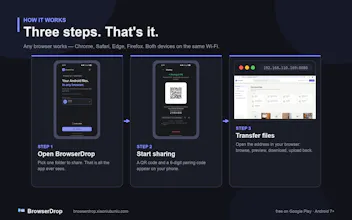
BrowserDrop lets you access your Android files from any desktop browser over your local Wi-Fi. Pick a folder on your phone, scan a QR code, and start browsing, previewing, downloading, and uploading files. No USB cable. No cloud storage. No desktop app. No account required. Your files stay on your local network, making BrowserDrop a simple and private way to move files between Android and your computer.


Launch Team

Build your Framer site from Claude, Codex or CursorYour AI agent builds it. You review before it goes live.
Promoted
