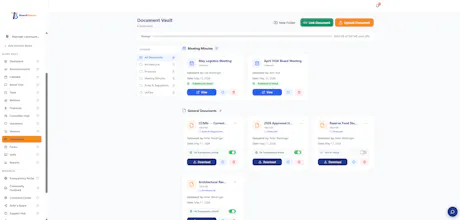
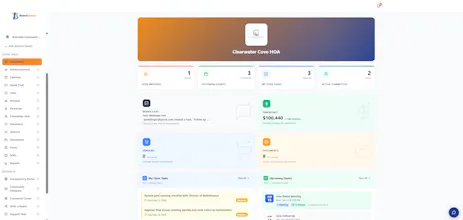
Board Beacon is launching publicly after building specifically for the most overlooked governance problem in community organizations: volunteer boards running HOAs, youth sports leagues, and nonprofits have no affordable, purpose-built tool. We built one. $30/month flat, 60-day free trial, with a Transparency Portal that gives community members a controlled window into board activity — something the enterprise tools ignore entirely.
No reviews yetBe the first to leave a review for Board Beacon
Maker
📌
I built this because I kept running into the same problem. I served on a volunteer board and watched good people burn out not because the work was hard, but because the tools were terrible. Everything lived in someone's personal inbox. When they left, the institutional knowledge left with them. The next person started from scratch every single time.
I looked at the existing board management software market and found two things: enterprise tools costing $200-$500/month built for hospital systems and publicly traded companies, and a complete void for the organizations that actually need help most — the self-managed HOA, the youth soccer league, the small nonprofit running on donated time.
So I built Board Beacon for those boards. The volunteer HOA treasurer who should not have to pay enterprise prices just to keep meeting minutes organized. The youth sports league president juggling a day job and Saturday games. The nonprofit board secretary trying to keep governance records straight between monthly meetings.
$30/month flat. No per-user fees. No tiers. A 60-day free trial. And a Transparency Portal that gives community members a controlled window into what their board is doing — because trust between boards and the people they serve is the whole point.
Would love your honest feedback, questions, or criticism. What would make this more useful for the boards you are involved with?
Report
How does the Transparency Portal actually decide what board activity gets shown versus hidden, and can members search or just browse what's pushed out?
Report
Maker
@serapokmk The board chair gets to choose what is shared is shared with their community. There are toggle switches for every page as well as specific details on the financials page. So, you can show the financials page to show things like fundraising, etc. but you can hide your budget and account balances, if you feel. The members get a login to the system to view or they can subscribe to a feed (weekly or monthly) to get pushed all activity since their last update.
Report
How does the Transparency Portal actually work in practice, like can board members choose which documents are visible or is everything shared by default?
Report
Maker
@hirabakrdvnljo So there are separate tabs on the Transparency Portal that correspond to the pages in the board portal. Each one of those tabs can be toggled on and off, but some have additional controls, like the finance tab and the documents tab. In finance, the board can show the tab or turn it off, if they choose to show it, they can toggle on/off anything that might appear in that tab. The same goes for documents. They can show the documents tab, but toggle which documents to share with the community and which to keep private.
Report
How does the Transparency Portal actually decide what gets shown versus kept private? Like, are board members reviewing each item before it posts, or is it all automatic based on rules you set during onboarding?
Report
Maker
@erdemzdzmxx3 The board chair controls what their community sees. Every page has a toggle, plus granular controls on the financials page, so you can show fundraising activity while hiding budget details and account balances, if that's what you prefer. Members can log in to view directly, or subscribe to a weekly or monthly feed that pushes all activity since their last update.
How does the Transparency Portal actually decide what board activity gets shown versus hidden, and can members search or just browse what's pushed out?
@serapokmk The board chair gets to choose what is shared is shared with their community. There are toggle switches for every page as well as specific details on the financials page. So, you can show the financials page to show things like fundraising, etc. but you can hide your budget and account balances, if you feel. The members get a login to the system to view or they can subscribe to a feed (weekly or monthly) to get pushed all activity since their last update.
How does the Transparency Portal actually work in practice, like can board members choose which documents are visible or is everything shared by default?
@hirabakrdvnljo So there are separate tabs on the Transparency Portal that correspond to the pages in the board portal. Each one of those tabs can be toggled on and off, but some have additional controls, like the finance tab and the documents tab. In finance, the board can show the tab or turn it off, if they choose to show it, they can toggle on/off anything that might appear in that tab. The same goes for documents. They can show the documents tab, but toggle which documents to share with the community and which to keep private.
How does the Transparency Portal actually decide what gets shown versus kept private? Like, are board members reviewing each item before it posts, or is it all automatic based on rules you set during onboarding?
@erdemzdzmxx3 The board chair controls what their community sees. Every page has a toggle, plus granular controls on the financials page, so you can show fundraising activity while hiding budget details and account balances, if that's what you prefer. Members can log in to view directly, or subscribe to a weekly or monthly feed that pushes all activity since their last update.