
Beads3D
Turn any image into buildable 3D bead blueprints
6 followers
Turn any image into buildable 3D bead blueprints
6 followers
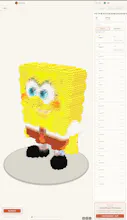
Beads3D turns a photo into a 3D model, breaks it into buildable Perler bead parts, and generates layer-by-layer blueprints with coordinates, color codes, exploded assembly views, and printable PDFs. You can also upload GLB, STL, or OBJ files directly.


Hi 👋
I built Beads3D because flat pixel patterns only solve half the problem. The hard part of a 3D bead project is figuring out the structure: which parts to make, how every layer fits together, and what order to assemble them.
Beads3D automates that workflow:
• Upload a JPG/PNG, or start from a GLB/STL/OBJ model
• Convert images into a 3D model
• Split the model into buildable bead parts
• Inspect the result in an exploded 3D view
• Follow layer-by-layer coordinates and color codes
• Download a printable PDF blueprint
It’s for Perler bead makers, pixel-art fans, craft creators, and anyone who wants to turn a picture into something physical.
New accounts get 5 free credits, so you can try the workflow before buying more.
I’d especially love feedback on two things: the image-to-3D result and whether the assembly blueprints feel clear enough for a first-time build. What would you make with it?
One thing that would really help is letting users adjust the bead palette before generation, so you can match the colors you actually own instead of getting stuck with whatever the algorithm picks.
honestly the exploded assembly view is what sold me, seeing each layer pre-laid out before you start fusing saves so much guesswork. nice execution.