Launching today

Bambu Bar
Your Bambu Lab 3D printer, live in the Mac menu bar
0 followers
Your Bambu Lab 3D printer, live in the Mac menu bar
0 followers
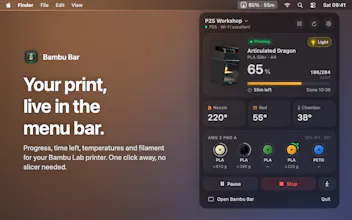
Bambu Bar puts your Bambu Lab printer in the Mac menu bar: progress, time left, temperatures, AMS filament, the live camera, desktop widgets and alerts when a print fails. It talks to the printer over your local network. No account, no cloud, open source.



Payment Required
Launch Team

AWS Startup AdvisorPersonalized AWS guidance that meets you where you’re already building
Promoted
Hey Product Hunt! 👋
I print a lot on my Bambu Lab P2S, and I kept opening Bambu Studio or my phone just to check "how long is left?". So I built Bambu Bar: the printer lives in the Mac menu bar, with the icon filling up as the print grows.
Reddit truly loves it: 👍⬆️ https://www.reddit.com/r/BambuLab/s/BJXhaT5Bsg
What it does:
Progress, time left and finish time at a glance, the rest one click away
Every printer at once, the ones that need you first
AMS spools with colour, material and grams left
Live camera, and a 3D model of your printer that prints along in the filament's colour
Desktop widgets that count down
Notifications when a print finishes, fails or runs out of filament, with the error in plain words
Pause, resume, stop, speed and the chamber light (LAN Only mode)
It talks straight to the printer over your local network, like the slicer's LAN mode. No account, no cloud, nothing collected, and your printer can stay bound to your Bambu Lab account. It runs under 1% CPU and speaks 18 languages.
Works with P2S, P1S, P1P, X1 Carbon, X1E, A1, A1 mini and the H2 family. Free, and open source under MIT.
I'd love to hear what you'd want next. What do you check on your printer most?