Launching today

Audio Clipper
Cut and trim MP3 in your browser, nothing gets uploaded
2 followers
Cut and trim MP3 in your browser, nothing gets uploaded
2 followers
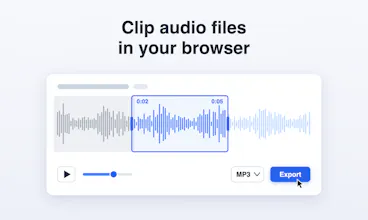
Open an audio file, drag the two handles across the waveform, and export just the part you need as MP3 or WAV. Decoding and encoding run on your own computer, so nothing is uploaded, there is no account to create, and the clip has no watermark.


Free
Launch Team / Built With


Render: Get up to $100K in startup creditsThe fastest way to deploy and scale apps and agents
Promoted
Hi everyone 👋
I built Audio Clipper because every time I needed thirty seconds out of a podcast episode, or a ringtone out of a song, I ended up on a site that wanted an upload, an account and a wait.
Audio Clipper does the cut inside the browser. You pick a file, the waveform appears, you drag two handles, you press Export, and the clip lands in your downloads as MP3 or WAV. The audio never leaves your computer, because there is no server to send it to, which also means it keeps working when your connection drops.
It opens in Chrome's side panel, so it sits next to whatever you are listening to. It is free, there is no watermark on the result, and the only permission it asks for is sidePanel.
Tell me what you would cut with it and what is missing. I am here in the comments all day.