Launching today

Yuzu Sync
Mirror, copy or two-way sync folders on your Mac
51 followers
Mirror, copy or two-way sync folders on your Mac
51 followers
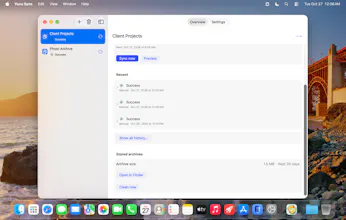
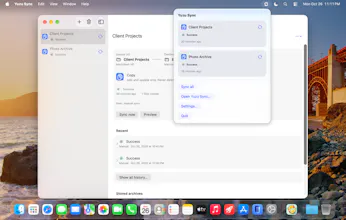
A small menu-bar app that keeps pairs of folders in sync with a bundled rsync engine. Mirror a project to an SSD, copy photos to a NAS, or sync both ways. Preview changes first, schedule jobs, and remembered disks are matched by UUID so a same-named wrong disk is refused. Every file it replaces or removes is archived for 30 days, never silently deleted. macOS 14+.



Launch tags:Productivity
Launch Team

CloudflareYour next app belongs on Cloudflare Workers. Deploy for free
Promoted
Hi Product Hunt! I'm Nguyen, the maker of Yuzu Sync.
Yuzu Sync is a small menu-bar app that keeps pairs of folders in step: a project mirrored to an SSD, photos copied to a NAS, or two folders synced both ways. It ships with its own bundled rsync engine.
• Three modes: Mirror (B becomes a copy of A), Copy (adds and updates, never deletes) and Two-way (the newer file wins).
• Preview lists every planned change before anything runs, and jobs can run on a schedule.
• Remembered disks are matched by UUID, so a different disk with the same name is refused instead of being written to.
• Every file it replaces or removes is archived on the destination for 30 days, never silently deleted. macOS 14+, Apple silicon and Intel. I'd love to hear which sync setups you want next.
does it do remote folders over ssh or just mounted disks? thats the only thing id need
Matching remembered disks by UUID is a small detail that matters a lot — a different disk with the same name being refused is exactly the kind of quiet safeguard that keeps a mirror job from writing to the wrong drive. The preview listing every planned change before anything runs helps too; sync tools earn trust by showing their work first.
Archiving every replaced or removed file for 30 days is the detail that would make me trust a sync tool. In two-way mode, does the preview also flag files that changed on both sides?