yFi

yFi

macOS utility app to monitor your WiFi connection.

3.0
1 review

4 followers

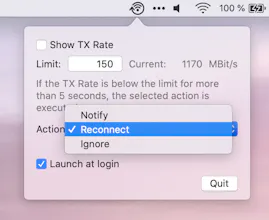
yFi is a small utility app that lives in your status bar. It continuously monitors your WiFi TX Rate and reconnects if it's getting bad. This ensures you'll never have those awkward lags and dropouts in online meetings (as we now are working remotely...).
yFi gallery image
yFi gallery image
yFi gallery image
Launch tags:MacMenu Bar Apps
Launch Team
Intercom
Intercom
Startups get 90% off Intercom + 1 year of Fin AI Agent free
Promoted

What do you think? …

Michael Fröhlich
@_rose_m_ It reminds me of WifiSpy which added the current TX rate to the status bar and gave context to the state of the connection. yFi now seems to offer a few additional config options. What TX limit would you recommend to set as a threshold? As a small feature request: I would like to get rid of the logo in the status bar and instead only have the TX rate shown. ;)
Michael Rose
@michael_frohlich Hey thanks for your feedback! I thought of recommending a default setting but it varies quite a lot. At home I have a 5Ghz network and set the limit to 100 - that seems to work really well. In some cases I had to go down to 50 for other networks. I couldn't test myself with slow networks easily but probably 50 is a good starting point. The higher you can set the limit the faster you'll be "back" as the update tick rate is around 2 seconds. Ah, good point with the logo, never thought of that - I'll add this as an issue on the GitHub repo and take a look at it :)
Michael Rose
@michael_frohlich I finally managed to do the update :) Version 1.1 should now be live on the App Store and you can select to only show the TX Rate! Have fun!
Michael Fröhlich
@_rose_m_ Thanks! That was quick :-D
Michael Rose
Hey everyone, this is my first small macOS app, starting from scratch and getting into Swift and all. The idea basically came as I was continuously annoyed by my connection suddenly getting bad and I only recognised it after couple of minutes in calls... I've now got it running for a month now all the time and it definitely saved me some meetings :D Especially since I can now pre-announce me dropping out for a couple of seconds and getting back in. The timeout typically fits perfectly so you still get everything from the conversation (e.g. in Zoom) and not missing anything. Have fun trying it out! :)
Pavel Kovalyov
Seems useful! Gonna test.
Michael Rose
@pavel_kovalyov Thanks! Let me know if you encounter any issues :)
Vlad Nekrutenko
hi! Nice product - is it connected to any VPN / does it suggest any option for non-secure connections?
Michael Rose
@vlad_nekrutenko Thank you :) No it's not connected to any VPN and does not monitor whether the connection is secure or not. What would be hints that maybe you would say would help you in these situations?
Vlad Nekrutenko
@_rose_m_ Understood, I might misunderstood the essence of the product at first. Im not sure if its achievable, but it would be great to alos know how much the connection is secure, especially if you connect from public WiFi
Noah Mittman
Had some initial confusion when seeing "MBit/s" and misreading it as "MBps" -- consider using "Mbit/s" to make it clearer Aside from this small confusion, it DOES come in handy to see when things are slowing down, and the idea of auto-reconnecting is great. Would be nice to have a cheat sheet of good limits to put in there, based on class of network applications.
Michael Rose
@noahmittman Ah good point, yes I'll change the labelling so it's clearer. Didn't think about the "application class" aspect but definitely a good point. I was also considering for the future to have network-specific settings. Like for your home WiFi it's at 250 (because you have a really good one) and at work it by default switches to 100 because you set the limit for this WiFi to a lower value since it fluctuates more. What do you think about this?