Wondering is the most delightful way to break down complex topics into knowledge you can remember and apply. Tell it what you want to learn, and it creates a personalized path of short lessons with visuals, podcasts, and interactive exercises. It surfaces the most important ideas and lets you explore them in your own way, like a thoughtful tutor beside you.
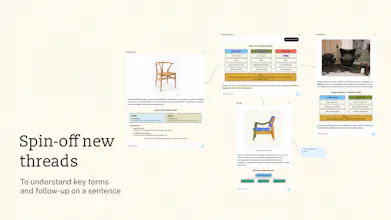
A visual canvas of AI chat threads for understanding anything in parallel. Start a chat thread with a question and get an explanation with interactive diagrams instead of a wall of text. Spin off any key term or sentence into its own thread, ask related questions in the same canvas, and follow suggested next questions. Explore every rabbit hole while keeping your thinking organized in one place.
Hi Product Hunt! I'm Angelica, one of the makers of Canvas!
Canvas is part of Wondering Desktop Web and is a visual way to understand things in parallel. We built Wondering because we felt like AI was giving us more answers, but we are understanding less.
When we want to learn a new concept for work, unpack a research paper, or understand any new topic, the learning process is rarely linear. Yet, when we ask AI, we can only ask follow-ups in the same chat thread or create new conversations so we don’t clutter up the first.
Canvas changes that!
Features: 🖼️ Replies with visuals and interactive diagrams, not just a wall of text Every response tries to show, not only tell. We add visual explanations with interactive diagrams so the information becomes easier to understand.
🌱 Spin up new chat threads Whenever you find a term you don’t understand or sentence to follow-up on, you can spin it off into its own thread without cluttering the original conversation.
💬 Suggestions galore Sometimes you don’t know what you don’t know. We highlight all the key terms so you can dive deeper into understanding those building blocks. We also suggest relevant questions you can ask in the chat thread or spin up a new one.
🧹Organize related chat threads together All related explorations are now grouped into one Canvas so it’s easy to revisit and make connections.
🗂️ Context stays together No more copy-pasting answers from one chat thread to another. Creating a new node from the first already pulls its context.
📝 Classic highlights and note-taking Of course, we have the ability to classically highlight and add notes to the whole chat thread or to a highlighted section of the chat.
Our goal is to make AI feel less like an answer machine and more like a learning environment, where you can build understanding one step at a time.
@busmark_w_nika hi nika! right now our focus here is on helping people understand things! would love to hear how you envision this to work with wireframing though!
Branching is the easy half. Every canvas tool I've tried is good at spinning threads off and useless at bringing them back, so you end up with a dozen branches and no way to say which three actually changed what you understood. If a branch can't fold back into the parent as a conclusion rather than a transcript, the canvas turns into a graveyard by the third session. Worth watching the cost side too, since each thread carries its own context and exploring gets expensive faster than it feels like it should.
@asadmalik901 Thanks for the feedback! Yes, we are working on summaries as a next step, and are creating a feature to help users create a course out of their canvas explorations. For now, each canvas is meant to help people go explore all the rabbit holes, like a working scratchpad, rather than keep them as general notes.
Report
@aka_kosasih Course out of a canvas is a much bigger claim than summaries, I'd ship it second. Scratchpad is a fine thing to be, the trap is that people treat anything with their own thinking in it as notes whether you meant them to or not, and get annoyed when it doesn't persist. The tell will be the first user who pastes a whole reading list in. That's who asks for folders.
Wondering
Hi Product Hunt! I'm Angelica, one of the makers of Canvas!
Canvas is part of Wondering Desktop Web and is a visual way to understand things in parallel. We built Wondering because we felt like AI was giving us more answers, but we are understanding less.
When we want to learn a new concept for work, unpack a research paper, or understand any new topic, the learning process is rarely linear. Yet, when we ask AI, we can only ask follow-ups in the same chat thread or create new conversations so we don’t clutter up the first.
Canvas changes that!
Features:
🖼️ Replies with visuals and interactive diagrams, not just a wall of text
Every response tries to show, not only tell. We add visual explanations with interactive diagrams so the information becomes easier to understand.
🌱 Spin up new chat threads
Whenever you find a term you don’t understand or sentence to follow-up on, you can spin it off into its own thread without cluttering the original conversation.
💬 Suggestions galore
Sometimes you don’t know what you don’t know. We highlight all the key terms so you can dive deeper into understanding those building blocks. We also suggest relevant questions you can ask in the chat thread or spin up a new one.
🧹Organize related chat threads together
All related explorations are now grouped into one Canvas so it’s easy to revisit and make connections.
🗂️ Context stays together
No more copy-pasting answers from one chat thread to another. Creating a new node from the first already pulls its context.
📝 Classic highlights and note-taking
Of course, we have the ability to classically highlight and add notes to the whole chat thread or to a highlighted section of the chat.
Our goal is to make AI feel less like an answer machine and more like a learning environment, where you can build understanding one step at a time.
You can try it out at https://wondering.app/canvas
If you try it, tell me what you’re using it to understand and your thoughts. I’ll be here all day.
minimalist phone: reduce your screentime
Can I use it for wireframing website as well?
Wondering
@busmark_w_nika hi nika! right now our focus here is on helping people understand things! would love to hear how you envision this to work with wireframing though!
Can teams together collaborate on this?
Wondering
@hsrambo07 Not yet, but interesting suggestion!
This was awesome to try, discovered on X btw
Wondering
@atharva_shah thank you!!
Branching is the easy half. Every canvas tool I've tried is good at spinning threads off and useless at bringing them back, so you end up with a dozen branches and no way to say which three actually changed what you understood. If a branch can't fold back into the parent as a conclusion rather than a transcript, the canvas turns into a graveyard by the third session. Worth watching the cost side too, since each thread carries its own context and exploring gets expensive faster than it feels like it should.
Wondering
@asadmalik901 Thanks for the feedback! Yes, we are working on summaries as a next step, and are creating a feature to help users create a course out of their canvas explorations. For now, each canvas is meant to help people go explore all the rabbit holes, like a working scratchpad, rather than keep them as general notes.
@aka_kosasih Course out of a canvas is a much bigger claim than summaries, I'd ship it second. Scratchpad is a fine thing to be, the trap is that people treat anything with their own thinking in it as notes whether you meant them to or not, and get annoyed when it doesn't persist. The tell will be the first user who pastes a whole reading list in. That's who asks for folders.