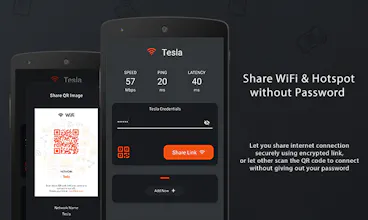
WifiLink is a brand-new app brings internet-users together, letting you share your Wi-Fi or hotspot with others through secured encrypted link, or one simple QR code. No more worries about forgetting (or exposing…) sensitive login information!
Does this redirect to WifiLink URLs or legacy QR code URLs? Both eventually expose the password, although the obfuscation step does add value.
Report
Maker
Hi @futhey ,
We do not redirect to WiFilink URLS or QR code URLS. When user click on the link we navigate them to WiFilink mobile app and connect them to network using mobile app. We have two options with which user can share their the wifi credentials:
1) Link: In this option we encrypt the credentials and share it. The encryption algorithm which we are using can only be decode with the key that makes it secure and no one can decode it. This option requires our app installed for both sender and receiver to encode and decode the credentials.
2) QR code: In this option you can view the password with a QR scanner. because we are using the native functionality with which you can scan the QR code with your mobile camera and it will ask you to connect with the network. In this option only sender required the app installed to generate the QR code and receiver can simply scan with their camera for connection.
@trippro Gotcha, thanks! So you can only retrieve the password if you use a third-party app to intercept the URL inside the QR code.
Nice app by the way!
Report
I want to know how to protect the WiFi password security, because many Android phones can share the password by sharing after connecting to the WiFi. When scanning and sharing the QR code, the clear text password will be exposed.
Report
Maker
Hi @rickys7 ,
WifiLink offers 2 option of sharing method. The encrypted link method, and QR code.
If you want to protect your WiFi password, please use the share link method. With this option, your credential is encrypted and share. The encryption algorithm which we uses can only be decode with the key that makes it secure and no one can decode it. This option requires our app installed for both sender and receiver to encode and decode the credentials.
The QR codes can be scanned and read from any QR scanner, thats why anyone can see the password. Its make sharing covenience, where you can share your WiFi or Hotspot with other in a click, and receiver don't have to installed our app, but it is not protected.
Hope this information helpful 😁
Report
Maker
👋 Hi everyone! Hope you all good and safe.
We created WifiLink to help people who uses same password for most of the things or activities, just like myself. Some of which often too easy to remember or guess, like birthday, anniversary, etc.
🤔 So when someone asks for my wifi password, I often stuck in this epic pause, thinking if I should give it out. This like giving out password for my laptop, atm, cloud account, amazon, app store, and gosh, believe me, it's on everything that required password.
🧘♀️ But that’s not going to happen anymore. The next time someone ask for my wifi password, I simply let them scan the QR code, or share a link with them. That way, they can connect to my WiFi without my password. No more worries about forgetting (or exposing…) sensitive login information!
Connection can be shared by scanning the QR code or by sending the encrypted link via various chat platforms. This is particularly great for restaurants, coffee shops, and other venues that offer WiFi. Visitors can simply scan a QR code that is placed out by the business to connect to wifi.
WifiLink is the better, smarter, and simpler way to connect and share. Rest assured with a piece of mind that your information is safe and protected. Whether you have a business or are just someone who wants to share connection with those around you, this is a must-have service.
I hope you find WifiLink valuable. And I hope it can help you share your WiFi or Hotspot connection with other easier and safer. Feel free to drop your feedback or question. Let us know if there is anything we can improve and make this a better app 😁
Also the fact that this REQUIRES gps location AND username / password is INCREDIBLY alarming. I cannot see any reason to enforce providing a gps location other than efforts to gain access to someones wireless network.
Report
Maker
@cody_mikol Again, thank you for pointing this out 😁
And thank you @Shahzeb Akram_akram for the explanation. Before you can start using this app and share your connection, it needs to connect to your WiFi. What it share is your existing WiFi network. So if there is no WiFi to connect, there is nothing to share. Any app that require to connect to WiFi, it is Android and iOS requirement to enable location.
Believe me, we all can trust how Android and Apple handling their security measurement. And I don’t believe they will approve this app in app store if it has alarming issue like you said? The app existence speak for itself.
Report
@cody_mikol Application encodes the credentials when you share with others. The GPS requirement is from Android and IOS if any third party application wants to manage the WiFi connection then it should require GPS. If you do not want want to use link sharing option then you can use QR code scanner option. The QR code scan option do not require GPS connection or application installed in the receivers phone as it is automatically readable with camera.
Report
I have been searching for Wifi Sharing app for a while and my search ends now. WifiLink, seems to be the answer. The app is slick. It has ads, but can live it it, though sometimes the ad screen goes blank (just black) and hope they are not creeping up on phone. Its SpeedTest/Ping & Latency result doesnt seem right, shows lot less speed and high ping & latency, than it is actually (verified by different speed check apps too). I hope the apps improves overtime.
Report
Nice I'll try it with my NFC stickers, should work as well
Report
Maker
@markus_saitmacher1 Thanks for checking this out. Please share the result with the NFC stickers. Thanks!




Gumshoe.io
Gumshoe.io
BURN.link