VoicePad turns your voice into text on Windows, Mac, iOS, and Android — 100% offline. Powered by Whisper AI, runs entirely on your device. The Orb floats over every app: tap, speak, text lands where your cursor is. Works in Gmail, Word, WhatsApp, your IDE — anywhere. No subscription. No cloud. No account. Free for the first 1,000 founding members. Built solo by a German bike mechanic who couldn't type with greasy hands.
No reviews yetBe the first to leave a review for VoicePad AI
Maker
📌
Hey Product Hunt 👋
VoicePad AI turns your voice into text, instantly, on any device — and it does it 100% offline.
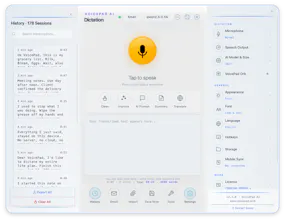
What it does: You talk, it types. Real-time dictation that drops clean text wherever you need it — documents, emails, chat, notes, code comments, forms. The speech recognition (Whisper) runs locally on your own hardware, so there's no lag waiting on a server and nothing ever leaves your machine.
Where you use it:
Windows & Mac — dictate into any window. Write emails, reports, messages by voice instead of typing.
Android & iOS — same engine in your pocket.
VoicePad Direct (Android) — a full voice keyboard. Tap the mic, speak, and your words land straight into any app — WhatsApp, Gmail, notes, search bars — no copy-paste, no switching apps. Live on the Play Store.
Why it's different:
Fully offline. No internet, no account, no telemetry, nothing uploaded. Your voice stays on your device — the whole point for anyone handling private or client data.
One-time payment. Buy once, own it. No subscription.
All four platforms, built by one developer from scratch.
English + German, language always forced for accuracy (no auto-detect guessing).
→ Claim your spot at www.voicepad.tech → And tell me what's broken, what's missing, what would make this a daily tool for you. I read every reply.
This is my first Product Hunt launch. I'll be here all day.
Alex voicepad.tech
VoicePad — We're alive, we grow, we create.
Report
@voiceapad I love that this is an offline tool. Such a time saver.
Report
@voiceapad The offline-first approach is what caught my attention. It's refreshing to see a product where privacy isn't dependent on trusting a cloud service.
I'm curious though: what was the biggest technical challenge in getting Whisper to run smoothly across all those platforms?
Report
💡 Bright idea
Offline Whisper on-device is exactly the tradeoff I want — cloud dictation means my IDE comments and DMs leave the machine, which is a non-starter for me. Which Whisper size ships by default, and is it quantized enough to stay usable on an older laptop with no GPU? And when the Orb drops text at the cursor, is that going through the OS accessibility API so it works in sandboxed apps, or synthetic keystrokes?
Report
Maker
@hi_i_am_mimo Great questions — exactly the right things to ask.
Model: Default is Whisper BASE (~150MB) running through faster-whisper (CTranslate2 backend) with int8 quantization, CPU-only — no GPU path at all on Windows, it's forced to CPU for stability. Measured performance: ~110ms to process 1 second of audio, so roughly 9x faster than real-time on the modest hardware I develop on. You can switch to larger models in settings, and if a bigger model fails the memory check it auto-downgrades to BASE instead of crashing. All models run locally after a one-time download.
Text insertion — honest answer: synthetic keystrokes, not accessibility-API insertion, and that's deliberate. On Windows the Orb uses SendInput with Unicode key events (so it's layout-independent), with a clipboard+paste fallback if the target window changes mid-dictation. UI Automation is only used read-only to detect whether the field you clicked is editable. Why keystrokes over UIA SetValue: it behaves like real typing, so it works in anything that accepts keyboard input — sandboxed apps, Electron, terminals, browsers, IDEs. The one real limitation, so you don't have to discover it yourself: elevated (admin) windows block input from non-elevated processes — that's a Windows security boundary, not something I'll work around. On Android, insertion goes through a proper IME (we migrated fully off AccessibilityService in v2.2.0), which is the sanctioned path and works in any text field.
On the privacy point: I audited the network surface before answering you — the only outbound calls are license validation (key + machine ID, never content) and optional LAN sync between your own devices. There is no code path that sends audio or transcripts anywhere. Not "we promise we don't" — there's no server to send them to.
Happy to go deeper on any platform.
Report
That clipboard+paste fallback is the part I'd watch — does it snapshot and restore whatever I already had on the clipboard, or could a mid-dictation window switch quietly clobber what I'd copied? And since the desktop insertion path is all Windows SendInput, is a macOS/Linux equivalent on the roadmap (CGEvent / uinput), or Windows + Android only for now?
Report
🔌 Plugged in
How does it handle background noise when you're actually out riding or in a busy shop environment?
Sure, there is a complex VAD energy filter and also multiple layers of pre and pro hallucinations filtering! The mic sensitivity plays also a crucial role, indoor and outdoor so ussing the right settings for the recording conditions!
I have planned for next version an indoor / outdoor mode, with different settings in filter sensitivity..I am still working on that, but I would say I have tested it in a busy city settings and it 99% hallucination free, with lower mic sensitivity so only close voice signals are being picked up and the rest are ignored. For a normal quiet room and normal voice tone the results are very good!
Report
Cool idea. Since this is offline, Is there a way to move data between devices. Assuming i change my laptop


Hey Product Hunt 👋
VoicePad AI turns your voice into text, instantly, on any device — and it does it 100% offline.
What it does: You talk, it types. Real-time dictation that drops clean text wherever you need it — documents, emails, chat, notes, code comments, forms. The speech recognition (Whisper) runs locally on your own hardware, so there's no lag waiting on a server and nothing ever leaves your machine.
Where you use it:
Windows & Mac — dictate into any window. Write emails, reports, messages by voice instead of typing.
Android & iOS — same engine in your pocket.
VoicePad Direct (Android) — a full voice keyboard. Tap the mic, speak, and your words land straight into any app — WhatsApp, Gmail, notes, search bars — no copy-paste, no switching apps. Live on the Play Store.
Why it's different:
Fully offline. No internet, no account, no telemetry, nothing uploaded. Your voice stays on your device — the whole point for anyone handling private or client data.
One-time payment. Buy once, own it. No subscription.
All four platforms, built by one developer from scratch.
English + German, language always forced for accuracy (no auto-detect guessing).
→ Claim your spot at www.voicepad.tech
→ And tell me what's broken, what's missing, what would make this a daily tool for you. I read every reply.
This is my first Product Hunt launch. I'll be here all day.
Alex
voicepad.tech
VoicePad — We're alive, we grow, we create.
@voiceapad I love that this is an offline tool. Such a time saver.
@voiceapad The offline-first approach is what caught my attention. It's refreshing to see a product where privacy isn't dependent on trusting a cloud service.
I'm curious though: what was the biggest technical challenge in getting Whisper to run smoothly across all those platforms?
Offline Whisper on-device is exactly the tradeoff I want — cloud dictation means my IDE comments and DMs leave the machine, which is a non-starter for me. Which Whisper size ships by default, and is it quantized enough to stay usable on an older laptop with no GPU? And when the Orb drops text at the cursor, is that going through the OS accessibility API so it works in sandboxed apps, or synthetic keystrokes?
@hi_i_am_mimo Great questions — exactly the right things to ask.
Model: Default is Whisper BASE (~150MB) running through faster-whisper (CTranslate2 backend) with int8 quantization, CPU-only — no GPU path at all on Windows, it's forced to CPU for stability. Measured performance: ~110ms to process 1 second of audio, so roughly 9x faster than real-time on the modest hardware I develop on. You can switch to larger models in settings, and if a bigger model fails the memory check it auto-downgrades to BASE instead of crashing. All models run locally after a one-time download.
Text insertion — honest answer: synthetic keystrokes, not accessibility-API insertion, and that's deliberate. On Windows the Orb uses SendInput with Unicode key events (so it's layout-independent), with a clipboard+paste fallback if the target window changes mid-dictation. UI Automation is only used read-only to detect whether the field you clicked is editable. Why keystrokes over UIA SetValue: it behaves like real typing, so it works in anything that accepts keyboard input — sandboxed apps, Electron, terminals, browsers, IDEs. The one real limitation, so you don't have to discover it yourself: elevated (admin) windows block input from non-elevated processes — that's a Windows security boundary, not something I'll work around. On Android, insertion goes through a proper IME (we migrated fully off AccessibilityService in v2.2.0), which is the sanctioned path and works in any text field.
On the privacy point: I audited the network surface before answering you — the only outbound calls are license validation (key + machine ID, never content) and optional LAN sync between your own devices. There is no code path that sends audio or transcripts anywhere. Not "we promise we don't" — there's no server to send them to.
Happy to go deeper on any platform.
That clipboard+paste fallback is the part I'd watch — does it snapshot and restore whatever I already had on the clipboard, or could a mid-dictation window switch quietly clobber what I'd copied? And since the desktop insertion path is all Windows SendInput, is a macOS/Linux equivalent on the roadmap (CGEvent / uinput), or Windows + Android only for now?
How does it handle background noise when you're actually out riding or in a busy shop environment?
@buse1342588
Sure, there is a complex VAD energy filter and also multiple layers of pre and pro hallucinations filtering! The mic sensitivity plays also a crucial role, indoor and outdoor so ussing the right settings for the recording conditions!
I have planned for next version an indoor / outdoor mode, with different settings in filter sensitivity..I am still working on that, but I would say I have tested it in a busy city settings and it 99% hallucination free, with lower mic sensitivity so only close voice signals are being picked up and the rest are ignored. For a normal quiet room and normal voice tone the results are very good!
Cool idea. Since this is offline, Is there a way to move data between devices. Assuming i change my laptop