VCam

VCam

AI powered live webcam background removal

3 followers

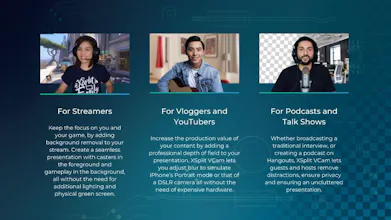
VCam makes cutting edge background removal and blurring possible with any webcam, without the need for expensive green screens, and complicated lighting setups.
VCam gallery image
VCam gallery image
VCam gallery image
VCam gallery image
Launch Team
AssemblyAI
AssemblyAI
Build voice AI apps with a single API
Promoted

What do you think? …

Eric Quinn Hargrove
Any plans for Mac OS version?
Sean Fee
@ericqhargrove Yes, we do plan on releasing for Mac. We built our initial release for PC first because of the gaming audience but we understand how many use cases there are outside of gaming too. Thanks for checking it out!
Darren Waring
@ericqhargrove @seanfee80 how are the plans progressing for the MAC version? A year since this comment and no MAC d/l on the website as yet ....
Sean Fee
@ericqhargrove @dazzlr Yeh, we've been super slow on this unfortunately as our entire engineering team was PC mainly with our gaming background. We also did some huge upgrades to the model and have improved performance massively over the last period so we held off on doing all the work for Mac until we had the new model in good shape. Good news is we've scaled up the team and have VCam 2.0 in the wild on PC for the last month with an incredibly positive response from our customers so we're full steam ahead on Mac and do plan to have it out before the end of the year (famous last words again!). Sorry for the delay, but we have tons of cool new products coming out in the next 3-6 months and Mac will be more of a focus for the future. 🙏
Nicolai Mihailiuc
@seanfee80 we are in almost in the middle of 2021, any updates? :)
Sean Fee
@nicolai_mihailiuc Hi Nicolai, sorry for the delay!! You can get VCam for Mac here now https://www.xsplit.com/vcam. Let us know if it's working ok for you.
Sean Fee
Hi PH, We just launched VCam as a way for live streamers to remove or replace their webcam background without the need for a green screen! Our app uses machine learning to identify and remove the background from your live video, so while we built it for our existing live streaming audience on XSplit it can also be used for any video conferencing, recording or streaming software...so, anywhere you might use your webcam. Another bonus with VCam is very minimal impact on your CPU, which is super important for gamers! Would love any feedback or questions from the community on the product :)
Sarah Evans
Can’t wait to try this out!
Kristofer™
@seanfee80 Any plans for a mobile SDK?
Sean Fee
@kristofertm Absolutely. Our initial use and test case is the game live streaming market as that's where our existing customers base for XSplit and Player.me are, but we do plan on branching out to additional markets which would then make a ton of sense for the mobile SDK. We're also getting a huge volume of training data so when the mobile SDK is released it will be incredibly robust.
Kristofer™
@seanfee80 Awesome. Post an update when you do - will be interested in taking a look.
Sean Fee
@kristofertm Will do. Thanks for checking it out 😃
David Klein
This is great!
Ethan Kellogg
I've been an XSplit customer for quite a while, using it primarily for my Twitch streaming for the last 4 years. I normally use a greenscreen for my broadcast, however I just moved recently and a majority of my streaming studio was packed when I wanted to broadcast one night. VCam allowed me to still have my webcam feed background free and it worked so well I put off setting my greenscreen up for over a week! The greatest part for me was how little of an impact the software had on my computer running alongside with all my other broadcast and stream software. RAM and CPU use are precious resources when streaming, and I was pleased that VCam didn't hog all of it to work properly. PROS: Easy to set up, easy to use. Completely removes background of webcam feed. Has built in options to replace background. Very minimal impact on computer resources. You can wear green again! CONS: The calibration process can make you feel a little silly as you have to move your head around, gesture with your arms, and look in different directions so that the software can learn what to remove. When I used it, it only worked for me. If anyone else popped into the view of the camera once set up, the software had a hard time and would create funky looking ghost effect on them as it tried to remove them from the feed. Wasn't a deal breaker, but something to keep in mind when using it. VCam has some default settings, called Automatic Settings, that will default every time the app starts regardless of what your settings were last time. Would be nice if you could save your settings and keep them locked in place as the default settings reduce the resolution of the camera feed to save resources. Using VCam and XSplit in conjunction, there was some fiddling and headaches with XSplit using my camera feed, stopping VCam from accessing it to do its thing. This was mainly because my XSplit scenes were already set up to use the raw feed of my webcam, and adding VCam afterwards. I got around this hiccup by making sure VCam was set up and running first before I opened XSplit. Again not a major issue, but it would be nice for these two programs that are under the same people to work a little better together from the get go. Overall it worked out wonderfully for what I needed. I'm planning on using VCam for the foreseeable future for any broadcasts that aren't located in my main streaming studio, or anytime I can't use my greenscreen. Thanks for taking the time to read!
Ethan Kellogg

I've been an XSplit customer for quite a while, using it primarily for my Twitch streaming for the last 4 years. I normally use a greenscreen for my broadcast, however I just moved recently and a majority of my streaming studio was packed when I wanted to broadcast one night. VCam allowed me to still have my webcam feed background free and it worked so well I put off setting my greenscreen up for over a week! The greatest part for me was how little of an impact the software had on my computer running alongside with all my other broadcast and stream software. RAM and CPU use are precious resources when streaming, and I was pleased that VCam didn't hog all of it to work properly. Calibration can make you feel a little self conscious as you have to move around swiveling your head and waving your arms as the app records you to learn what to remove. Not too big of a deal for me, but might result in less than ideal settings for people who don't go all in during the process. Also once calibrated, no one else can walk in to the camera frame without the software trying to remove them. Makes them look weird and ghost like. Using VCam and XSplit in conjunction, there was some fiddling and headaches with XSplit using my camera feed, stopping VCam from accessing it to do its thing. This was mainly because my XSplit scenes were already set up to use the raw feed of my webcam, and adding VCam afterwards. I got around this hiccup by making sure VCam was set up and running first before I opened XSplit. Again not a major issue, but it would be nice for these two programs that are under the same people to work a little better together from the get go. Overall it worked out wonderfully for what I needed. I'm planning on using VCam for the foreseeable future for any broadcasts that aren't located in my main streaming studio, or anytime I can't use my greenscreen. Thanks for taking the time to read!

Pros:

Easy to set up, easy to use. Removes or replaces background. Low impact on computer resources. You can wear green again!

Cons:

Once calibrated, can't have more people show up on feed. Settings don't save, always revert to default on startup.

Sean Fee
Thanks for the comprehensive review Ethan and delighted you're finding it so useful! I'll pass on your issues to the dev team so they can look at improving it 😃
12
Next
Last