
Time Left
Track your life in weeks and meaningful moments
34 followers
Track your life in weeks and meaningful moments
34 followers
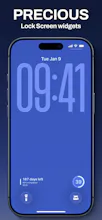
Time Left is an iOS life calendar that turns your remaining weeks into a simple visual timeline. Add past and future moments, personalize Home Screen and Lock Screen widgets, and keep your personal data stored locally.


Free Options
Launch Team / Built With


AWS Activate CreditsCredits that fuel your startup’s next milestone
Promoted
does the local storage mean everything stays on device or are widgets pulling data from a synced backup somewhere?
@halilsl6f Nope, everything stays on your device. For backups, you can export the local data yourself.
How does it handle data if I switch to a new phone, since everything is stored locally?
@bedirhan19697 You can export/import them manually :-)
How does the timeline update if you change your birthdate or want to add multiple life segments down the road, and is that adjustment something you can do from the widget itself or only inside the main app?
the local-only data approach for something this personal feels like the right call, especially paired with widgets that actually fit the home screen aesthetic instead of fighting it
The widgets are genuinely the best part — seeing the weeks laid out on my Lock Screen makes time feel less abstract somehow. Appreciate that everything stays on device too, no account fuss.
The widget on my Lock Screen actually makes me pause for a second each time I check the time, which I didn't expect. Love that everything stays on the phone too.