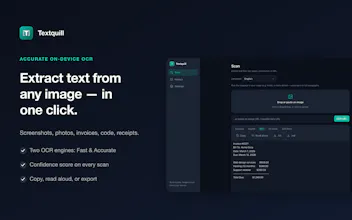
Textquill extracts text from any image, screenshot or PDF — then proofreads, translates and rewrites it, all on your device. 38 OCR languages, an offline grammar checker that works in any text box on any site, and Chrome's local AI. No account, no uploads.
No reviews yetBe the first to leave a review for Textquill
Maker
📌
Hey Product Hunt! 👋
I'm Sundar — I built Textquill because I was tired of retyping text trapped in images: screenshots, photos of documents, signs, slides, receipts.
Textquill turns any image into editable text right in your browser, and everything runs on your device. No account, no uploads, no tracking — your images and the text in them never leave your computer.
What you can do:
• Right-click any image on the web → Extract text
• Select any area of the screen (Alt+Shift+S)
• Drop in, drag & drop, or paste an image
• 16 languages incl. Hindi, Chinese, Arabic, Japanese (+ auto-detect)
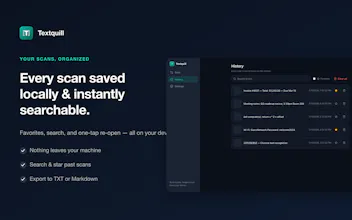
• QR & barcode detection, read-aloud, searchable local history
• Export to TXT or Markdown, light & dark mode
It's free and works offline (after a one-time language download for non-English). The OCR runs locally via WebAssembly, so it's private by design — a safe choice for screenshots of private messages, documents, or work whiteboards.
I'd genuinely love your feedback: what would make this a daily-use tool for you? Which languages and workflows matter most? I'm around all day to answer anything. 🙏
→ Add to Chrome: https://textquill.app
Report
Super smooth right-click OCR on web images and the offline angle is genuinely reassuring. The read-aloud feature was a nice surprise, though I wish the area selection tool had a magnifier for pixel-perfect cropping.
Report
Maker
@memetsanayi Appreciate this, Memet, read-aloud is one of those features people don't expect until they need it. And you're right about the area-select magnifier for pixel-perfect cropping; it's a real gap. I've added it to the roadmap so cropping tight regions gets easier. Thanks for the sharp feedback 🙌
Report
Love the offline approach and the right-click extraction sounds super handy. One thing I'd love to see is a small floating mini-toolbar that pops up right after the text is extracted, with quick options like "copy," "translate," or "open in editor," so I don't have to dig into the extension menu every time.
Report
Maker
@canturel1pwy Love this, Can -a little floating toolbar right at the extraction point ("copy / translate / open in editor") without
diving back into the menu is exactly the kind of friction I want gone.
It's on the roadmap. And glad the offline + right-click approach clicked for you that was the whole idea.
Appreciate the sharp suggestion! 🙌
Report
A history of recent extractions inside the extension popup would be really useful so you can grab something you copied earlier without re-snipping. Maybe even with a quick search across the saved snippets.
Report
Maker
@polat0sfi Good news, Polat, that history already exists: Textquill keeps a local history of your extractions,
so you can grab something from earlier without resnipping.
Search across saved snippets is the piece that's not there yet,
and it's a great call I've got it on the roadmap. Thanks for the thoughtful ask! 🙏
Report
Right-clicking an image and getting clean text back without any upload step feels refreshing, and the offline OCR is impressively fast even on screenshots.
Thanks Süleyman! That was exactly the goal text out of an image without the "upload, wait, come back" hop. Everything runs on-device, so screenshots stay fast because nothing's leaving your machine. Really glad the offline speed landed for you 🙏
Report
Right-clicking an image and grabbing the text felt almost instant, which surprised me for a fully offline tool. The 16-language support is a nice bonus on top of that smooth experience.
Report
Maker
@deniz220617 Thank you, Deniz! The "instant even though it's fully offline" reaction is my favorite to hear, on-device OCR means there's no round-trip to a server slowing you down. The 16 languages run locally too. Thanks for the kind words!
Report
Maker
V2 is live — and it's a bigger change than the version number suggests.
V1 got text out of images. V2 does the rest of the job, still without a server:
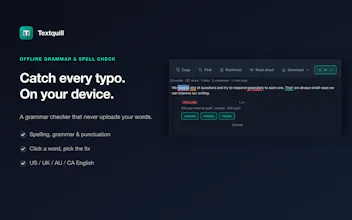
• Offline grammar & spell check — not just on extracted text, but live in the text boxes of any site you type on. Your writing is never uploaded to be checked. US/UK/AU/CA, per-site off switch.
• On-device translation
• AI writing tools on Chrome's built-in local model — summarize, clean up messy OCR, rewrite, explain, action items
• 38 OCR languages (up from 16), with script auto-detect
• PDF input with page ranges and passwords
• Export to TXT, Markdown, CSV, HTML, DOCX, JSON, XML
Still free, still no account, still nothing leaves your machine. The grammar engine is local, so it works in browsers with no cloud AI at all — including Brave.
Thank you to everyone who asked for PDF and AI cleanup at launch. Both shipped. What should V3 do?
Super smooth right-click OCR on web images and the offline angle is genuinely reassuring. The read-aloud feature was a nice surprise, though I wish the area selection tool had a magnifier for pixel-perfect cropping.
@memetsanayi Appreciate this, Memet, read-aloud is one of those features people don't expect until they need it. And you're right about the area-select magnifier for pixel-perfect cropping; it's a real gap. I've added it to the roadmap so cropping tight regions gets easier. Thanks for the sharp feedback 🙌
Love the offline approach and the right-click extraction sounds super handy. One thing I'd love to see is a small floating mini-toolbar that pops up right after the text is extracted, with quick options like "copy," "translate," or "open in editor," so I don't have to dig into the extension menu every time.
@canturel1pwy Love this, Can -a little floating toolbar right at the extraction point ("copy / translate / open in editor") without
diving back into the menu is exactly the kind of friction I want gone.
It's on the roadmap. And glad the offline + right-click approach clicked for you that was the whole idea.
Appreciate the sharp suggestion! 🙌
A history of recent extractions inside the extension popup would be really useful so you can grab something you copied earlier without re-snipping. Maybe even with a quick search across the saved snippets.
@polat0sfi Good news, Polat, that history already exists: Textquill keeps a local history of your extractions,
so you can grab something from earlier without resnipping.
Search across saved snippets is the piece that's not there yet,
and it's a great call I've got it on the roadmap. Thanks for the thoughtful ask! 🙏
Right-clicking an image and getting clean text back without any upload step feels refreshing, and the offline OCR is impressively fast even on screenshots.
@sleyman585188
Thanks Süleyman! That was exactly the goal text out of an image without the "upload, wait, come back" hop. Everything runs on-device, so screenshots stay fast because nothing's leaving your machine. Really glad the offline speed landed for you 🙏
Right-clicking an image and grabbing the text felt almost instant, which surprised me for a fully offline tool. The 16-language support is a nice bonus on top of that smooth experience.
@deniz220617 Thank you, Deniz! The "instant even though it's fully offline" reaction is my favorite to hear, on-device OCR means there's no round-trip to a server slowing you down. The 16 languages run locally too. Thanks for the kind words!
V2 is live — and it's a bigger change than the version number suggests.
V1 got text out of images. V2 does the rest of the job, still without a server:
• Offline grammar & spell check — not just on extracted text, but live in the text boxes of any site you type on. Your writing is never uploaded to be checked. US/UK/AU/CA, per-site off switch.
• On-device translation
• AI writing tools on Chrome's built-in local model — summarize, clean up messy OCR, rewrite, explain, action items
• 38 OCR languages (up from 16), with script auto-detect
• PDF input with page ranges and passwords
• Export to TXT, Markdown, CSV, HTML, DOCX, JSON, XML
Still free, still no account, still nothing leaves your machine. The grammar engine is local, so it works in browsers with no cloud AI at all — including Brave.
Thank you to everyone who asked for PDF and AI cleanup at launch. Both shipped. What should V3 do?