
TenTags – Declarative (IR) for Documents
Declarative Intermediate Representation (IR) for Documents
13 followers
Declarative Intermediate Representation (IR) for Documents
13 followers
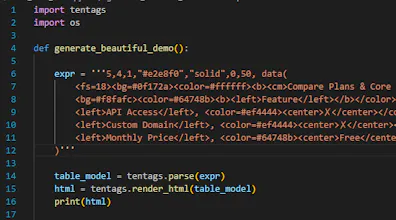
TenTags is an open-source declarative document language and Intermediate Representation (IR) for generating structured documents. Instead of embedding programming logic into templates, TenTags uses a compact semantic syntax that can be generated by Python applications and AI agents. Compile the same document definition into HTML, PDF, Excel (.xlsx), and future output formats while keeping business logic separate from presentation.




Hi Product Hunt! 👋
I'm an independent developer from Kazakhstan, and over the last few days I've been building TenTags.
Most template engines mix presentation with programming logic. I wanted something simpler:
* data stays in Python
* templates stay clean
* no complex template language
* reusable semantic components
TenTags lets you generate HTML documents directly from Python dictionaries.
It works well for:
• reports
• invoices
• documentation
• dashboards
• static pages
• emails
It's completely open source and available on GitHub and PyPI.
I'd love to hear your feedback and ideas!
It's a nice idea, I have used LaTeX before which was overwhelming to get used to but then very powerful. This looks easy to get used to but more limited, do you plan to keep expanding to add more things or are you going to focus on simplicity? LaTeX I used for engineering projects at university, was really good with displaying equations which is overall a pretty niche case, maybe you don't care about that?
@mjohnson42 Thanks for the great question and feedback! You've captured the core design tradeoff perfectly.
You're absolutely right: LaTeX is the gold standard for academic papers and mathematical equations, but its learning curve and compilation overhead can be overwhelming for general software developers.
Our main philosophy with TenTags is simplicity, predictability, and AI-friendliness:
Focus on Simplicity & Speed: We want TenTags to remain extremely lightweight and easy to generate programmatically. A major goal is making it optimized for LLMs (like GPT, Claude, or Gemini) to generate layout grids dynamically without layout hallucinations or syntax errors, which frequently happen with verbose LaTeX or raw HTML/CSS.
Tabular Focus vs. LaTeX Equations: Displaying complex math equations is a bit out of scope for TenTags. We are targeting accounting, ERP, business invoicing, and CRM dashboard tables where alignment, cell merging, and clean exports to Excel/PDF/HTML are the top priorities.
Future Expansion: While we want to keep the syntax simple, we do plan to expand. However, instead of making the formatting language more complex, our expansion will focus on adding more rendering backends (like DOCX, Markdown, or SVG) and supporting larger document layouts (like page headers, footers, and page breaks).
Thanks again for checking out the project! If you ever need to generate dynamic business reports or data grids on the fly, TenTags is designed to make that transition as painless as possible.
Finally someone separated business logic from presentation without forcing me into a template engine. The same .tentags file spitting out both PDF and xlsx from Python is genuinely useful, and the syntax feels way more compact than Jinja or LaTeX.
@emirhan26363 Thank you! I'm glad you noticed that. Separating document logic from presentation wasn't the primary goal, but it turned out to be one of the most useful properties of the format. Once everything is described in a single .tentags or .ttgs document, generating both PDF and XLSX from the same source becomes straightforward.
📢 Big Update: TenTags v1.1.0 is Live! Introducing Multi-Table & Report Orchestration!
We’ve just released TenTags v1.1.0 (Production-Stable) which transforms the library from a simple table generator into a powerful multi-format report orchestrator!
Here’s what’s new in this release:
🗂️ Multi-Table Rendering: You can now assemble multiple independent tables into a single output file!
HTML: Render beautiful side-by-side dashboard grids with CSS Grid.
Excel: Export tables to separate worksheets (mode="sheets") or stack them vertically on a single sheet (mode="stacked") with custom gaps and headers.
PDF: Build clean multi-page document PDFs with page breaks and page-specific layouts.
♻️ Reusable Styling Templates: Preamble parameters and styles are now completely detached from the raw datasets. You can declare one style template and apply it dynamically across different data blocks!
🏁 Smart Border Control Suffixes: Added support for -1 (forces inner grids to draw) and -0 (renders a completely borderless table while preserving column alignment).
🧼 Cleaner Syntax: Preamble parameters (like Hex colors and style names) can now be written without quotes, making your DSL queries much cleaner.
Version 1.1.1 is already live on PyPI (pip install -U tentags[all]). Check out the updated repository and documentation for complete examples!
GitHub: https://github.com/Jandos77/tentags
Let us know what you think of the new multi-table reporting features! 🚀
🚀 TenTags 2.0.2 is now available!
This is one of the biggest updates since the initial launch:
Django, Flask, FastAPI and Jinja2 integrations
New template tag system
Apache 2.0 license
Improved rendering and template workflow
Numerous fixes and performance improvements
Thanks to everyone who tried TenTags and shared feedback after the launch. Your suggestions directly influenced this release. I'd love to hear what you'd like to see next!